
How can we help?

Popular searches


Select a help topic
-

Instant SIM
Instant SIM
Consumer Portal Frequently Asked Questions
- What is the Instant SIM?
The Instant SIM is an innovative product by Vodafone Qatar that allows customers to self-activate a new Prepaid or Postpaid connection instantly, anywhere and anytime in Qatar, without needing internet access.
- How does the Instant SIM work?
To activate the Instant SIM, customers need to:
- Insert the SIM into a smartphone with a camera.
- Scan the QR code on the SIM pack or visit www.vodafone.qa/activate
- Choose their line type: Prepaid or Postpaid.
- Provide the necessary eKYC documentation (Passport for Prepaid or Qatar ID for Postpaid).
- Follow the online steps to activate the SIM instantly.
- What makes the Instant SIM unique?
The Instant SIM is unique because:
- It allows customers to self-activate without needing Wi-Fi or any internet connection.
- There’s no need to wait in queues or visit a Vodafone store.
- Customers can choose between a Physical SIM or an eSIM.
- It does not require a credit or debit card for activation.
- Do I need an internet connection to activate the Instant SIM?
No, an internet connection is not required to activate the Instant SIM. As long as the Instant SIM is inserted in the phone and data is switched on, the process is designed to work with special dedicated data for the process of eKYC.
- Can I choose between a Physical SIM and an eSIM?
Yes, customers have the option to choose between a Physical SIM and an eSIM when using the Instant SIM.
- What happens to the Physical Instant SIM if I choose eSIM?
The physical SIM will no longer be valid
- What documents do I need to activate my Instant SIM?
For a Prepaid connection, you will need your Passport or a valid Qatari ID. For a Postpaid connection, you will need your Qatar ID. These documents are required for the eKYC (electronic Know Your Customer) process during activation.
- How long does it take to activate the Instant SIM?
The activation process is instant and can be completed within a few seconds, depending on how quickly you can follow the steps. However in case of prepaid it may take up to 2 minutes and for Postpaid activation it can take up to 15 minutes after your complete activation steps.
- Can I use the Instant SIM with any smartphone?
Yes, the Instant SIM can be used with any smartphone that has a camera for scanning the QR code and supports SIM or eSIM functionality.
- What happens if I encounter an issue during activation?
If you encounter any issues during activation, you can visit a Vodafone store to continue with the activation. In that case, you will be provided with a new SIM free of charge and activation will be performed by one of our sales agents.
- Is the Instant SIM available only in Qatar?
Yes, the Instant SIM is currently available exclusively in Qatar, and it is the first of its kind in the GCC region.
- Can I activate the Instant SIM for both Prepaid and Postpaid services?
Yes, the Instant SIM can be activated for either Prepaid or Postpaid services, depending on your preference.
- What are the benefits of using the Instant SIM compared to traditional SIM activation methods?
The benefits include:
- Instant activation without needing internet access.
- No need to visit a store or wait in queues.
- Flexibility to choose between a Physical SIM or an eSIM.
- No requirement for a credit or debit card.
- Convenience of purchasing from various retail locations or ordering online.
- Can I choose a number during activation
For Prepaid activation customer is assigned automatically a free number.
In case of postpaid, customer is can choose a Free Number or a star number which comes for free with the plan or can select a higher value star number. However in that case, customer will need to make a payment for the star number for which customer will need to connect to a WiFi network.
- Can I buy multiple Instant SIMs at once?
Yes, you can purchase multiple Instant SIMs however remember you can not have more 2 postpaid and a maximum for 5 connections under your ID.
- Is there a validity period for the Instant SIM after purchase?
While the SIM itself may not expire immediately, it’s recommended to activate the SIM soon after purchase to ensure it functions as intended. Specific validity terms may apply.
- How do I know if my activation was successful?
After completing the activation process, you will receive a confirmation message on your smartphone, an SMS and an email indicating that your line is active and ready for use.
- What should I do if I lose my Instant SIM before activation?
If you lose your Instant SIM before activation, you will need to purchase a new one. It’s essential to keep your SIM card secure until activation is complete.
- Can the Instant SIM be used for international roaming?
Yes, once activated and used locally, the Instant SIM can be used for international roaming. However you may need to activate a roaming add-on after activation to use Voice and Data services.
- What should I do if my smartphone doesn’t support eSIM?
If your smartphone doesn’t support eSIM, you can opt for the Physical SIM version of the Instant SIM during the activation process.
- Can I transfer my existing Vodafone number to an Instant SIM?
Transferring an existing Vodafone number to an Instant SIM requires additional steps. It’s recommended to contact Vodafone customer support for detailed instructions.
- In case of Prepaid activation; can I recharge online after activation?
After the activation, Vodafone gives you free data to make an online recharge and pay for it using your debit or credit card?
- In case of Prepaid activation; can I recharge from any retail store?
Yes, you can Vodafone’s prepaid cards or request a digital voucher from more than 2000 locations in Qatar.
- Can I activate the Instant SIM on MyVodafone App
Yes, if you already have the MyVodafone App downloaded and have internet access, you can continue with Self Activation on MyVodafone App. However, remember that you can continue your activation on Web even if you don’t have internet access.
- Can I recharge with any product or only selected products will work on Instant SIM
Yes, you can recharge with any existing Prepaid recharge product. However, we do recommend 6 products as part of the activation journey which are:
- Combo 40
- Combo 65
- Combo 100
- Credit 20
- Combo 15
- Ahlan 65
- Is there an Offer for Postpaid customers
Yes, customers will continue to get existing Digital offer for these Postpaid plans
- Can I still activate a Postpaid connection from Website?
Yes, you can activate a Postpaid connection on eSIM or Instant SIM (if you have one) once you start the purchase journey from Vodafone website
In case of Postpaid, customers have the option to request Home delivery of the SIMs?
- Can I request Home delivery of a SIM through online activation of prepaid plan?
No, the home delivery is only available for Postpaid customers.
- Can I start self-activation without having an Instant SIM?
Yes, you can visit Vodafone website or MyVodafone App to start purchasing a Prepaid or Postpaid connection. You can activate an eSIM for Prepaid or Postpaid connection or you can request home delivery of SIM for a Postpaid connection.
- Do I need to do anything extra to start using my Instant SIM after activation?
Prepaid customers, will need to recharge to have the allowances to make calls or use internet. They can start receiving calls immediately.
Postpaid customers, will need to “restart the phone” or “Switch on and Switch off airplane mode” to be able to use the line for the first time.
-

Postpaid
Vodafone World
- What is Vodafone World?
Vodafone World is a program designed to bring added lifestyle value to Vodafone postpaid customers through exclusive monthly vouchers redeemable with well-known partner brands.
- Who is eligible to join Vodafone World?
- Vodafone World is available to Postpaid customers who subscribe to or upgrade to one of the New Unlimited+ Plans, including:
- New Unlimited+
- New Unlimited+ Premium
- New Unlimited+ Platinum
- New Unlimited+ VIP
- Vodafone World is available to Postpaid customers who subscribe to or upgrade to one of the New Unlimited+ Plans, including:
- What benefits do I receive as a Vodafone World member?
Eligible customers receive a monthly Discount to redeem with Vodafone’s partner brands:
Plan Monthly Voucher Value New Unlimited+ Up to QR 30 New Unlimited+ Premium Up to QR 50 New Unlimited+ Platinum Up to QR 100 New Unlimited+ VIP Up to QR 150 - How can I redeem my Vodafone World discount ?
- Open the My Vodafone App
- Go to the Vodafone World section
- Browse the available benefits
- Select your benefit (only one benefit can be redeemed per month)
- Can I split my voucher across different benefits?
No. Eligible customers can redeem only one benefit per month, and the full value must be used on a single selected partner.
- Can I change my benefit within the same month?
Yes, you can switch your benefit. You’ll continue enjoying your current benefit until your bill date. Once your new bill cycle starts, you’ll need to go to My Vodafone App and subscribe to the new benefit.
- Where can I find more information about Vodafone World partners and offers?
- You can:
- Explore the Vodafone World section in My Vodafone App
- Visit the Vodafone World for full details
- Do my unused vouchers carry over to the next month?
No. Discounts are valid for one month only and do not carry forward if unused.
- What happens to my Vodafone World benefit if disconnect?
If number is disconnected, you will not be able to use the Vodafone World benefits. If the voucher is saved somewhere, you can use that within 30 days if not redeemed yet.
- What happens to my Vodafone World benefit if I change to another Unlimited Plan?
If you change your plan, you will be able to subscribe to new Vodafone World benefit based on new plan. You will not be able to view previous benefits.
11. Can I change my benefit within the same month?· Yes, but the new benefit will be available after bill renewal date
Valet Parking
- What is the Valet Parking benefit?
- As a Vodafone New Unlimited+ customer, you can enjoy complimentary valet parking at select locations in Qatar, including:
- Place Vendome Mall
- Katara (Bayt El Talleh, U Burger, Lafayette, Mosque, Sukar Pasha, Novikov, Cartier, Beach2)
- Porto Arabia (The Pearl)
- Medina Centrale (The Pearl)
- Ezdan Mall
- As a Vodafone New Unlimited+ customer, you can enjoy complimentary valet parking at select locations in Qatar, including:
- Who is eligible for Digital Valet Parking?
Customers on the following New Unlimited+ plans are eligible:
Plan Valet Benefit New Unlimited+ Premium Regular Valet parking service with 4 usages of Regular parking per month New Unlimited+ Platinum & VIP VIP Valet parking service with 4 usages of VIP parking per month - How do I use the Valet Parking service?
- Download and log in to the My Vodafone App
- Navigate to the Digital Valet Parking section
- Follow the steps to claim and use your valet benefit
- Can I use my valet benefit multiple times in an hour?
No. Each valet service is limited to once per hour and cannot be shared across different users or vehicles.
- Can Vodafone modify or stop this benefit?
Yes. Vodafone reserves the right to disable or modify the Valet Parking benefit at any time at its discretion.
- Where can I see or manage my valet benefit?
Go to the My Vodafone App > Digital Valet Parking section to view your usage, redeem valet benefits, and manage your subscription.
Call+
- What is Call+?
Call+ is an Over the Top (OTT) feature available via the My Vodafone App (MVA) that lets eligible Vodafone customers make voice calls over data while roaming. It allows calling back to Qatar and international destinations using your plan’s data. - Who is eligible to use Call+?
- New Unlimited+ Plans customers get Call+ free of charge.
- Postpaid+ Plans customers can access Call+ by subscribing to the Call+ Add-on for QR 100/month.
- How do I activate Call+?
- Call+ is only accessible through My Vodafone App (MVA).
- New Unlimited+ customers get automatic access while roaming.
- Postpaid+ customers must subscribe via MyVodafone App to activate the add-on.
- Do I need an internet connection to use Call+?
Yes, you need to be connected to the internet (via roaming data or Wi-Fi). If you don’t have access to the internet, Call+ will not work even if you still have minutes available. - Are there any charges for using Call+?
- New Unlimited+ Plans: Free Call+ service with 1000 minutes per month to any destination while roaming.
- Postpaid+ Plans: QR 100/month gives you 1000 minutes per month to call Qatar while roaming. This paid add-on includes 1 GB roaming data to enable outgoing calls via My Vodafone app (MVA) while roaming.
- No separate charge applies as long as you stay within your data roaming allowance.
- Excess roaming data usage may result in standard roaming data charges.
- Is there any chance that I can expire this 1 GB roaming data in paid add-on for any other reason?
Yes, 1 GB roaming data is not dedicated for enabling Call+. So, please ensure this roaming data is NOT used for any other reason, otherwise, you will not be able to make the call unless you are connected to Wi-Fi. - What happens if I exceed my Call+ minutes?
You will be charged 35 Dirhams/minute for calls back to Qatar once your 1000 minutes are used. - What happens if I don’t have enough roaming data remaining to make a Call+?
You will be charged OOB for roaming mobile data usage to make the Call+ if you still have available Call+ minutes - Where can I use Call+?
Call+ can be used while roaming abroad, if you have internet access and are using the My Vodafone App. - Can I use Call+ without the My Vodafone App?
No. The service is only available within the My Vodafone App and cannot be used independently. - Does Call+ support emergency numbers?
No. Call+ does not support emergency calls. Always use traditional phone services for emergencies. - Will Call+ work everywhere while roaming?
Call quality depends on network conditions like bandwidth, latency, and internet stability. The experience may vary based on the country, network, and device used. - What happens if I switch between networks during a call?
There is no guaranteed continuity. Calls may drop or be interrupted if you move between different networks (e.g., from 4G to Wi-Fi). - Is the service guaranteed to work at all times?
Call+ is delivered on a best-effort basis. As it runs over third-party networks, Vodafone cannot guarantee consistent performance or call quality. Besides, service availability is dependent on the country's rules which allow VoIP service. - Does Call+ work on all phones?
- Functionality may vary depending on:
- Device type
- Operating system version
- Background apps or activities
- Functionality may vary depending on:
- Can I hold or merge VoIP Calls?
No, it’s not available. - Can I still receive mobile voice calls while a VoIP call is in progress?
Yes, you can still receive mobile voice calls. - If I am on a normal call, can I start a VoIP Call?
Yes, but with one condition that the data connection should remain - Can I use my phone if I am on VoIP Call?
Yes, you can
Social Media
1. What is the Social Media Data Allowance?
The Social Media Data Allowance allows customers to use specific social media applications without consuming data from their main data bucket.
2. Which social media applications are included in this allowance?
The included social media applications are:
3. How does the Social Media Data Allowance work?
When you use any of the included social media applications, data will first be deducted from your Social Media Data Allowance. If you use all the data in this allowance, further usage will consume data from your main data bucket.
4. Is the Social Media Data Allowance available while roaming?
No, the Social Media Data Allowance is restricted to local use only. While roaming, data usage on these social media applications will either consume your available roaming data allowance or be charged as out-of-bundle usage.
5. What happens if I use a VPN?
If you access the included social media applications through a VPN, the data will not be deducted from your Social Media Data Allowance. Instead, it will be consumed from your main plan's data allowances.
6. What happens if I run out of my Social Media Data Allowance?
Once you have used all the data in your Social Media Data Allowance, any further usage of the included social media applications will consume data from your main data bucket.
7. Can I use the Social Media Data Allowance on other applications?
No, the Social Media Data Allowance is specifically for TikTok, Snapchat, WhatsApp, Instagram, and Facebook. Data used on other applications will be deducted from your main data bucket.
8. Will my Social Media Data Allowance be renewed?
Social media allowances are permanent and will renew along with your data plan on a monthly basis.
[SR1]Does this include Messenger app? Does this include the use of Messenger within the Facebook app?
[IA2]No it doesn’t include Messenger app. It includes only facebook app.
International Call Block (ICB)
- What is International Call Block?
International Call Block (ICB) is the service that allows customers to block all international calls regardless of the location of the customer.
- How can customers enable and disable the International Call Block service?
Customers can enable and disable Mute service via My Vodafone App or USSD (enable 369, disable 360).
- Can customers still make international calls if the International Call Block service is enabled?
Yes, they still can make international calls if they have the international call block service enabled.
- Who can use this service?
- This service is available for new Postpaid+ and New Unlimited+ plans customers only
- For New Unlimited+ Platinum and New Unlimited+ VIP customers, it is free of charge.
- For New Unlimited+ and New Unlimited+ Premium customers, it is free of charge for the first 6 months. After 6 months, unless customers deactivate this service, they will be charged QR 10 per month.
- For Postpaid+ customers, it’s QR 10 per month if subscribed.
Mute
- What is Mute?
Mute is a service that allows customers to block any incoming calls when enabled
- How can customers enable and disable Mute service?
Customers can enable and disable Mute service via My Vodafone App or USSD
- Who can use this service?
- This service is available for new Postpaid+ and New Unlimited+ plans customers only
- For New Unlimited+ Platinum and New Unlimited+ VIP customers, it is free of charge.
- For New Unlimited+ and New Unlimited+ Premium customers, it is free of charge for the first 6 months. After 6 months, unless customers deactivate this service, they will be charged QR 10 per month.
- For Postpaid+ customers, it’s QR 10 per month if subscribed.
- What is Vodafone World?
-

Multi SIM
Multi SIM
1. What is a Multi SIM?
• A Multi SIM is an additional SIM card that is linked to the same MSISDN as your primary SIM. It allows you to use the same mobile number on multiple devices. Multi Sim Data allowances will be same as your primary data allowance for example if a customer have 200GB in their primary SIM the Multi SIM will consume data from the 200GB allowance.
• FUP per Multi SIM is: 50 GB / month
2. How many Multi SIMs can I purchase?
You can purchase up to 4 Multi SIMs in addition to your primary SIM, giving you a total of 5 SIMs (1 main SIM and 4 additional Multi SIMs).
3. What forms are available for Multi SIMs?
Multi SIMs are available in both physical SIM card form and eSIM form.
4. Can I use data on all my Multi SIMs?
Yes, but the data usage on additional Multi SIMs is restricted to local data only.
5. What happens if my primary SIM is barred or terminated?
If your primary SIM is barred or terminated, all the Multi SIMs linked to that primary SIM will also be barred or terminated automatically.
6. What happens if the customers downgrade from a plan with Free SIM to charged SIM?
You will be charged for Multi SIM, based on the plans they subscribe to
7. Can I make calls and send texts using Multi SIMs?
No, you can only use local Data on Multi SIM
8. Can I use my Multi SIMs while roaming?
Data usage on Multi SIMs is restricted to local data only sm
9. How do I Purchase/activate Multi SIMs?
You can purchase and activate your Multi SIMs through Vodafone retail stores
10. Are there any restrictions on the devices I can use with Multi SIMs?
You can use Multi SIMs in any compatible device, such as smartphones, tablets, or Laptop, if the device supports either a physical SIM or eSIM.
11. What happens if the customers downgrade from a plan with Multi SIM available to a plan in which Multi SIM is not available?
Multi SIMs will become deactivated, so the customers will not be able to use their Multi SIMs.
12. Can I share my data and voice allowance across my SIMs?
Only the data allowance can be shared. The voice allowance will only be available on the primary SIM.
13. How many bills will I receive for Multi SIM? Can I have a customized bill split by SIM?
It will be shown as an add on the bill. -

iPoints
iPoints
1. What is the Vodafone Loyalty Program?
The Vodafone Loyalty Program is a point-based loyalty program to reward Vodafone’s loyal customers (“You/Your”) with points, based on your current spending or recharge (“Loyalty Program”). You can use and redeem points to get different benefits and discounts (“Loyalty Benefits”).
2. Am I eligible to join the program?
Any Vodafone customer including Postpaid, Prepaid and Home customers are eligible to join. The more services you have from Vodafone Qatar the more points you can get.
3. How can I join?
Any new or existing Vodafone Customer can join the program by enrolling on the My Vodafone App (“MVA”) using their primary number which receives the bill (“Primary Number”). All connections under the same QID will be automatically included.
4. How will I know I’ve successfully enrolled?
Once you enroll, you’ll receive confirmation. Your secondary numbers linked to the same QID will also be included automatically.
5. How do I earn points?
Points are earned based on your spending with Vodafone services, including Postpaid bills, Prepaid recharges, and Home services. Points are calculated post-payment.
6. How long does it take for points to reflect on my account?
Points may take up to 48 hours to appear in your account after payment.
7. Why are my points not reflecting the correct amount on the App?
Points can take up to 48 hours to reflect on your iPoints account after successful bill payment or recharge. If points are not reflected after 48 hours, you can raise a request for support through the My Vodafone App. If support is still needed, please contact our team by either calling the call center or raising a request through MVA. - Soumya to confirm time needed.
8. What are the program tiers?
The program has four tiers based on spending:- Bronze: Earn 1 point per QR 1 spent.
- Silver: Earn 1.5 points per QR 1 spent.
- Gold: Earn 2 points per QR 1 spent.
- Black: Earn 2.5 points per QR 1 spent.
Your tier is based on your total Vodafone spending over the last 12 months. Spending thresholds for each tier are:- Bronze: Up to QR 4,799/year
- Silver: QR 4,800–11,999/year
- Gold: QR 12,000–23,999/year
- Black: QR 24,000+/year
Points expire in (1) year from earning them. For example, you get your points on 15 Oct 2025 then your points earned will expire on 14 Oct 2026.
11. How can I redeem my points?
You can redeem points via the My Vodafone App for telecom services, partner discounts, and vouchers. Check the app for updated redemption options.
12. What is the Spin and Win feature?
Spin and Win allows you to use points to get guaranteed 1 local SMS and a chance to win prizes such as additional points, discounts, or gifts. The required points per spin are displayed on the app.
13. Are there any additional costs associated with using the Spin and Win Wheel?
Each Spin will cost specific number of points to participate and will be indicated to You before spinning
14. Can I preview the prizes available on the Spin and Win Wheel before spinning?
Yes, you can preview the prizes before spinning and they will be in the form of a Voucher (“Voucher”).
15. Are there limits on earning or redeeming points?
There’s no limit to how many points you can earn or redeem in a day.
16. Can I transfer my points?
No, points are non-transferable and can only be redeemed by the primary account holder.
17. What happens if I disconnect my Vodafone account or port my number?
All points will expire if your primary account is disconnected or ported out.
18. How do I track my points and rewards?
All points and redemption details are available on the My Vodafone App under your account.
19. Can I extend the validity of my points?
No, point validity cannot be extended.
20. Will new redemption options be added?
Yes, new telecom benefits, partner deals, and vouchers will be added regularly. Check the app for updates.
21. What happens if I cancel and re-enroll?
If you cancel and re-enroll, your previous points and tier status will not be restored.
22. How can I convert my points into Avios?
You can convert your points into Avios through the App. Simply log in, find the relevant conversion option, and select it.
23. What information do I need to complete the conversion to Avios?
To complete the conversion, you must enter your Qatar Airways Privilege Club membership number. This is necessary for Avios to be credited to your Qatar Airways account.
24. Can I change my Qatar Airways Privilege Club membership number after submitting the request?
No, you must ensure you enter the correct Qatar Airways Privilege Club membership number, as Avios once credited cannot be reversed.
25. Where can I track my Avios balance and transaction status?
Qatar Airways Privilege Club members can track their Avios balance by logging in to their Qatar Airways Privilege Club account on the Qatar Airways App / website. -

iPass
iPass
- What is iPass?
iPass is a membership program that unlocks fantastic benefits, including offers, deals, and other privileges. Whether you're looking for the best in ladies' experiences, family fun and entertainment, fitness, wellness, or luxurious lifestyle perks, our iPass Digital Card has you covered.
- Fitness Pass
- Wellness Pass
- Laha Pass
- Entertainment Pass
- Black Pass – This pass is exclusively available to Unlimited +Platinum and Unlimited + VIP customers.
With your iPass membership, you can enjoy handpicked benefits across Qatar, making it easy to save and access great deals and offers while exploring the best that Qatar has to offer.- Can anyone buy a Pass?
- Passes are available as Add-Ons for existing Vodafone customers.
- New customers can purchase passes through the My Vodafone App.
- Certain passes are bundled with new Unlimited Postpaid Plans.
- How can I get a Pass?
- Log in to the My Vodafone App to see the list of available passes.
- Select and subscribe to your chosen pass (based on plan eligibility).
- You can view and update your pass selection through the My Vodafone App.
- How do I choose a Pass?
- Vodafone Postpaid customers without a pass bundled in their plans can add passes through the My Vodafone App.
- Postpaid customers with a pass included in their plan can log into the My Vodafone App to access it.
- Existing Vodafone Postpaid customers must register through the My Vodafone App.
- How many passes can I add?
- Customers on the Unlimited+ plan can choose 1 pass from the 4 available options.
- Customers on the Unlimited+ Premium plan can choose 2 passes from the 4 available options.
- Customers on the Unlimited+ Platinum plan can choose 3 passes from the 4 available (including the Black Pass).
- Customers on the Unlimited+ VIP plan can choose 4 passes from the 4 available (including the Black Pass).
- Additional passes can be purchased through the My Vodafone App.
- What can I redeem?
- Exclusive discounts and exciting offer vouchers from various merchants, depending on your pass type.
- Where can I find the Passes?
- All pass details are available in the My Vodafone App for Vodafone customers.
- Is there a limit to how many vouchers or discounts I can redeem at once?
- As long as the voucher/discount is active, customers can use them. Details for each voucher/discount are visible in the app.
- Can I transfer my Pass?
- No, passes cannot be transferred.
- Are there any restrictions on when or how I can redeem my Pass voucher?
- Each offer used by an iPass member is subject to the iPass Rules of Use. For more details, please refer to the Pass voucher page.
- Do passes expire?
- Passes are renewed as long as customers remain active on eligible Vodafone plans.
- Do offers change on the passes?
- Yes, offers change from time to time. Customers can view the latest offers by checking their passes in the My Vodafone App.
- How do I track my passes?
- All passes can be tracked in the My Vodafone App.
- How can I use a Pass benefit/offer?
- Visit the participating outlet and speak to a staff member.
- Share your iPass digital card number (your membership number) with the merchant staff to access the desired benefit/offer.
- What partners/merchants are part of iPass?
- The list may change and can be accessed in the iPass section on My Vodafone App.
- If I have more than one postpaid line from Vodafone, can I subscribe to multiple passes for free?
- Free passes depend on the type of plan each customer is subscribed to.
- Passes are not linked to the customer's Qatar ID.
- Additional passes are available at an extra cost.
- Passes are tied to the plan, not the customer.
- What is iPass?
-

My Vodafone
Recharge options using My Vodafone App Who can use My Vodafone App? Bill Payments via My Vodafone App Can the App be used if line is barred or deactivated?
Using app over Wi-Fi
• You can use My Vodafone App up to 5 times on Wi-Fi or up to 1 week.
• Whatever is reached first, the app will ask you to disable Wi-Fi and re-authenticate using Vodafone Qatar 3G/4G network.
• For security reasons you need to turn off Wi-Fi and connect to 3G/4G Vodafone Qatar network or roaming network, either after 5 times on Wi-Fi or after 1 week.
• After authentication you can continue using the app over Wi-Fi.
Bill details error

• The reason why you are seeing this message is because your number is not matching the Contact number you provided during your registration with Vodafone.
• Please call our contact centre or visit the nearest store if you want to change the registered contact number in our system with your current number.
Can't see product and Extras in homepage
• Check if you are using the same SIM (Number) as you registered to check- in to the app. To check the number, go to menu and the number will be displayed as the “Welcome (Your Number)”.
• Please call our contact centre or visit the nearest store if you have to change the registered contact number in our system with your current number.
App Crash
• Uninstall the App
• Go to the App Store/Play Store, download and re-install the App again
Unable to view Homepage/Available balance
You may not be authenticated:
• Turn off Wi-Fi data completely
• Check if network time is the phone time
• If using a dual sim phone, put Vodafone as SIM1, turn off SIM2 completely
-

Network
Voice Over Wi-Fi
- What are the unique benefits of Voice Over Wi-Fi Calling?
The Service is free of charge.
Improves your coverage where cellular connections is weak.
Crystal clear calls & high voice quality - How do I set up Voice Over Wi-Fi Calling?
Connect to a Wi-Fi network on your Wi-Fi Calling capable smartphone.
Update your smartphone to the latest OS and switch Wi-Fi Calling “On"
For a seamless experience you should keep both VoLTE and Wi-Fi Calling switched on - Do I need to keep VoLTE switched on, to make a Wi-Fi Call?
Yes, for a seamless experience you should keep both VoLTE and Wi-Fi Calling switched on. - Are calls made over Wi-Fi Calling charged at the same rate as normal call?
Yes, Voice Over Wi-Fi is treated exactly the same as a regular call. - What are the requirements for Voice Over Wi-Fi Calling?
Customers must have the following requirements:
A Wi-Fi calling- smartphone
Latest OS needs to be installed
Wi-Fi Calling service should be switched on
For a seamless experience you should keep both VoLTE and Wi-Fi Calling switched on - What happens if Wi-Fi gets disconnected between the call?
The call will switch over to VoLTE and there will be a seamless handover. If VoLTE is not switched on, the call will drop. - What happens if I move away from the router during the call?
As long as the Router can provide good coverage, the call will remain on Wi-Fi. If you move very far away from the router, the call will switch over to VoLTE and there will be a seamless handover. If VoLTE is not switched on, the call will drop. - How do I know if the call is going through Wi-Fi?
You can verify a Wi-Fi Call by looking for a unique symbol shown on your handset during a Wi-Fi Call. You will not see the Wi-Fi Call symbol during a normal cellular call. - Will Wi-Fi Calling work on all broadband/Wi-Fi or only Vodafone broadband?
The service is live for WIFI inside Qatar - Can I use Wi-Fi Calling while roaming?
No, the service is available only for use locally in Qatar. - Can I use Wi-Fi calling for making international calls?
Yes, Wi-Fi Calling can be used to make international calls. Regular call charges will be applied. - Can I access through personal Hotspot connection?
yes. - To enable the service on iphone device
Not available at the moment - To enable the service on Huawei device.
- Menu Icon
- Setting
- Mobile Networks
- Wi-Fi Calling
- Press the indicator to Switch WiFi calling on or off
- To enable the service on Samsung device.
- Menu Icon
- Settings
- Connections
- Press the indicator next to Wi-Fi calling to turn on or off
Dropped calls
• Please make sure that your SIM is active
• Check for your area coverage on our website or My Vodafone app.
• Select network manually
• Switch between 2G and 3G
• Please try to restart your handset or try your SIM on a different handset
• If all the above steps fail, please contact us to help you further or raise a complaint for you
• Please keep the below details ready with you while contacting us for further troubleshooting:
- 1. Were you able to make successful calls in this area before?
- 2. Start date of issue
- 3. Experiencing issues with all areas and numbers or specific only?
- 4. Issue indoors or outdoors?
NOTE: If you have another Vodafone SIM and it works fine in the same location, we advise you to attempt to replace your SIM at the nearest Vodafone Store as it could be a faulty SIM card.
Indoor/Outdoor coverage issue
• Please make sure that your SIM is active
• Check for your area coverage on our website or My Vodafone app.
• Select network manually
• Switch between 2G and 3G
• Please try to restart your handset or try your SIM on a different handset
• If all the above steps fail, please contact us to help you further or raise a complaint for you
• Please keep the below details ready with you while contacting us for further troubleshooting:
- 1. Were you able to make successful calls in this area before?
- 2. Start date of issue
- 3. Experiencing issues with all areas and numbers or specific only?
- 4. Issue indoors or outdoors?
NOTE: If you have another Vodafone SIM and it works fine in the same location, we advise you to attempt to replace your SIM at the nearest Vodafone Store as it could be a faulty SIM card.
Slow data performance issue
• Please make sure that your SIM is active
• Check for your area coverage on our website or My Vodafone app.
• Select network manually
• Switch between 2G and 3G
• Please try to restart your handset or try your SIM on a different handset
• If all the above steps fail, please contact us to help you further or raise a complaint for you
• Please keep the below details ready with you while contacting us for further troubleshooting:
- 1. Were you able to make successful calls in this area before?
- 2. Start date of issue
- 3. Experiencing issues with all areas and numbers or specific only?
- 4. Issue indoors or outdoors?
NOTE: If you have another Vodafone SIM and it works fine in the same location, we advise you to attempt to replace your SIM at the nearest Vodafone Store as it could be a faulty SIM card.
Voice Quality issue
• Please make sure that your SIM is active
• Check for your area coverage on our website or My Vodafone app.
• Select network manually
• Switch between 2G and 3G
• Please try to restart your handset or try your SIM on a different handset
• If all the above steps fail, please contact us to help you further or raise a complaint for you
• Please keep the below details ready with you while contacting us for further troubleshooting:
- 1. Were you able to make successful calls in this area before?
- 2. Start date of issue
- 3. Experiencing issues with all areas and numbers or specific only?
- 4. Issue indoors or outdoors?
NOTE: If you have another Vodafone SIM and it works fine in the same location, we advise you to attempt to replace your SIM at the nearest Vodafone Store as it could be a faulty SIM card.
Manual Settings
Apple iPhone: 5, 5s, 6, 6s, 6 Plus, 6s Plus, 7
• Press Settings
• Press Mobile
• Press Mobile Data Network
• Enter APN: web.vodafone.com.qa
• Press "APN" below "MOBILE DATA"
• Key in web.vodafone.com.qa
• Save settings
• Press Mobile
• Press Settings
• Return to the home screen
• Press the Home key to return to the home screenSamsung: Note 2, Galaxy S2, S3 & etc.
• Press the Menu Key &Press Settings
• Press Wireless & network
• Press Mobile networks
• Press Access Point Names
• Press the Menu Key &Press New APN
• Press Name
• Enter: VFQ Internet
• Press APN
• Key in web.vodafone.com.qa
• Press Authentication type
• Press None
• Press APN Type
• Press Internet
• Press the Menu Key &Press SaveSamsung: Galaxy S6, S6 Edge, Note 4, Note 5 & etc.
• Slide your finger down the display starting from the top edge of your phone
• Press the settings icon
• Press More networks
• Press Mobile networks
• Press Access Point Names
• Create new data connection
• Press the new data connection icon
• Enter data connection name
• Press Name
• Key in Vodafone Internet and press OK
• Enter APN: web.vodafone.com.qa
• Press APN
• Key in web.vodafone.com.qa and press OK
• Enter country code
• Press MCC
• Key in 427 and press OK
• Enter network code
• Press MNC
• Key in 02 and press OK
• Select authentication type
• Press Authentication type
• Press PAP
• Select APN type
• Press APN type
• Key in default and press OK
• Select data bearer
• Press Bearer
• Press Unspecified
• Save and activate data connection
• Press the menu icon
• Press Save
• Press the field next to the data connection to fill in the field
• Return to the home screen
• Press the Home key to return to the home screenNokia: Any Nokia device
• Slide your finger down the display starting from the top edge of your phone
• Press ALL SETTINGS
• Press mobile+SIM
• Press SIM settings
• Create new data connection
• Press the indicator next to "Manual Internet APN"
• Enter APN: web.vodafone.com.qa
• Press the field below "APN" and key in Vodafone Internet
• Save data connection
• Press the save icon
• Return to the home screen
• Press the home icon to return to the home screenSony: Any Sony device
• Slide two fingers down the display starting from the top edge of your phone
• Press Settings
• Press More...
• Press Mobile networks
• Press Access Point Names
• Create new data connection
• Press the new data connection icon
• Enter data connection name
• Press Name
• Key in Vodafone Internet and press OK
• Enter APN: web.vodafone.com.qa
• Press APN
• Key in web.vodafone.com.qa and press OK
• Press OK
• Enter country code
• Press MCC
• Key in 472 and press OK
• Enter network code
• Press MNC
• Key in 02 and press OK
• Select authentication type
• Press Authentication type
• Press PAP
• Select APN type
• Press APN type
• Key in default and press OK
• Select data bearer
• Press Bearer
• Press Unspecified
• Save and activate data connection
• Press the menu icon
• Press Save
• Press the field next to the data connection to fill in the field
• Return to the home screen
• Press the home icon to return to the home screenVodafone: Any Vodafone device
• Slide two fingers down the display starting from the top edge of your phone
• Press the settings icon
• Press More
• Press Mobile networks
• Press Access point names
• Create new data connection
• Press the create data connection icon
• Enter data connection name
• Press Name
• Key in Vodafone Internet and press OK
• Enter APN: web.vodafone.com.qa
• Press APN
• Key in web.vodafone.com.qa and press OK
• Enter country code
• Press MCC
• Key in 472 and press OK
• Enter network code
• Press MNC
• Key in 02 and press OK
• Select authentication type
• Press Authentication type
• Press PAP
• Select APN type
• Press APN type
• Key in default and press OK
• Select data bearer
• Press Bearer
• Press Unspecified
• Save and activate data connection
• Press the menu icon
• Press Save
• Press the field next to the data connection to fill in the field
• Return to the home screen
• Press the Home key to return to the home screen - What are the unique benefits of Voice Over Wi-Fi Calling?
-

Billing
Billing
How much is my first bill?
Click here to check your estimated first bill
How to know my bill amount and pay it?
You can check your bill amount & pay it through:- My Vodafone App (Apple or Android)
- Vodafone Website
- Vodafone Chatbot
- Vodafone Self-Service Machines
- Banks Applications & ATM
If your bill payment had failed, please make sure to:- Keep a proof of your payment always
- You did not try to make payments through a different channel earlier
- The number you are paying for is active
Why I didn't receive my bill?
If you can't see your bill in My Vodafone app, please note:- For new Vodafone Customers, “My Bill” will be unlocked after your first bill is generated.
- Make sure you are the number owner to see your bill details
- For Enterprise customers, your company may have blocked this feature and therefore this option is unavailable.
- Check if the email you provided is active. If not, please chat with us to update your billing email address.
- Check your junk and spam folders on email.
- Check if you have set any email management rules to save Vodafone emails in a separate folder.
- Locate invoice attachment & right click on it. You may get an option to “Save” or “Download Attachment”.
- Vodafone always sends the PDF copy of your bill as an attachment in the email.
- Ensure your smart phone or computer has Adobe PDF readerTM installed to open & read your bill.
- Please note that some corporate email addresses block external emails.
- You can check your bill online through our website or My Vodafone app (Apple or Android)
Why my bill is high?
We recommend to check your usage details instantly by downloading your bill in My Vodafone app:- Login to My Vodafone app
- Click on "My Bill" in the homepage
- Click on "Download bill"
- A discount was applied to your number but it has expired
- You had third party charges. Check Direct Operator Billing for more details.
- Activated Add-ons
- Purchase of Add-Ons and Extras
- Purchase of Value Added Services
- Extra usage out of plan benefits
-
Short Codes
Activate or Deactivate ring Back Tone
• Please try to restart your handset or try your SIM on a different handset
• Checks if you have available spend limit or credit limit
• Make sure that the following activation or deactivation steps are followed:
Activation Method
• Call 195 from your mobile phone and follow the instructions to choose the song you would like to set as your Ring Back tone. (A call to 195 costs 50Dhs per minute)
• SMS to 195: Send ACT RBT SONG CODE to 195. E.g. ACT RBT 111222 (An SMS to 195 is free of cost)
• Press * when you listen to a song that you like while waiting for your friend to pick up the phone, this is applicable if your friend is a Vodafone customer
Note: If you have already set a song earlier and then pressed the * key or sent an SMS for copying a song, your song set for all callers will be replaced with a new song.
Deactivation Method
• Deactivate this service by sending an SMS with the letters “DCT” to 195 and service will be deactivated
• Customers can also call 195 and follow the instructions on how to deactivate Caller Tunes
• Calls to 195 costs 50Dhs/Minute
• SMS to 195 is free
• Restart handset and try to activate/deactivate
Not Able to use *100#
• Please note that this option is not for Mobile Broadband customers
• Check if the number is active on Vodafone network (able to use data, calls & SMS)
• Check Notification number registered with us is the same as your current number. If Not, Please call our contact centre or visit the nearest store to change the registered contact number in our system with your current number. If correct, proceed with the below steps.
• Restart handset and switch network mode of the handset:
iOS:
Go to Settings > Cellular > Cellular Data Options > Voice & Data
Select other network mode (4G/3G/2G) in which you are not currently connected. There may be different network modes available depending on where you are.
ANDROID:
Go to Settings > Mobile Networks > Network Mode
Select other network mode [WCDMA only, GSM only, WCDMA/GSM (auto connect), LTE/WCDMA/GSM (auto connect)] in which you are not currently connected.
• Restart handset
• If all the above steps fail, please contact us to help you further or raise a complaint for you
Unable to activate or deactivate Voice Mail
• Please try to restart your handset or try your SIM on a different handset
• Voicemail service is pre-activated for all Vodafone customers
• Please make sure that you have followed the below steps:
1. To activate dial ##002# from your mobile phone to switch it back on. OR *100# (follow the Vodafone menu; Select “My Settings”, then “Setup voicemail and missed call preference”)
2. To deactivate Voicemail simply dial **004*141# from your mobile phone. You can also activate or deactivate it through *100# (Select “My Settings”, then “Setup voicemail and missed call preference”)• Try the different methods mentioned above
• Restart handset
• If all the above steps fail, please contact us and we will help you further or raise a complaint for you
Not able to deactivate Add-on Offer
• Please try to restart your handset or try your SIM on a different handset
• Please ensure that you have used the correct Short Code
• Make sure that your number is not barred
• Check your spend limit
• Check your outstanding balance and credit limit as having less credit limit than the add-on cost will prevent you from activating the add-on
• Please note: Some products can be activated from the Short Code Menu if you are the primary account holder. If you are not the authorised person of your account and you are trying to activate the add-on, system will not allow as per current rules
• If all the above steps fail, please contact us and we will help you further or raise a complaint for you
Unable to activate/deactivate offers/products using a Short Code
• Please try to restart your handset or try your SIM on a different handset
• Verify the deactivation short code used
• Check if you have enough SMS balance to deactivate the short code
NOTE: Deactivation cost if FREE however, you need to have remaining balance
• Restart handset and try to deactivate again
• If all the above steps fail, please contact us and we will help you further or raise a complaint for you
Unable to activate Metrash
• Verify phone model you are using to register to Metrash. NOTE: iOS, Android and BlackBerry OS are supported; however, Windows OS are currently not supported
• Verify the version of Metrash customer wants to register to.
NOTE: Metrash1 is by default a part of Metrash2 Service
• Make sure that QID expiration date is updated
• Make sure that the Mobile number that you used to register for the Metrash2 Service is under your Qatari ID
• Check if you have any recent provisioning or Transfer Of Number orders
NOTE: If you have a new connection or Transfer of Ownership then you have to wait for a week to be able to register for Metrash.
• For any queries, comments or any problems relating to Metrash2 Application contact email: Info@moi.gov.qa /Support centre No: 2342000. (24/7 working)
• If all the above steps fail, please contact us and we will help you further or raise a complaint for you
-

Roaming
Roam Like Home Weekly Pack (GCC)
- What is the Roam Like Home Weekly Pack for GCC?
It’s a roaming pack that allows Postpaid customers to use their local plan allowances (data, minutes, SMS, and add-ons) while roaming in GCC countries for 7 days. - How much does it cost?
The pack costs QR 125 and is valid for 7 days from the time of activation. - Which countries are included in this pack?
This pack is valid in the GCC countries:- Saudi Arabia
- United Arab Emirates
- Oman
- Bahrain
- Kuwait
- Who can activate this pack?
Only Postpaid individual customers on eligible plans can activate the pack.
It is not available for Prepaid customers.
Eligible Plans:U Start Legacy U Plus Legacy U Plus India Legacy Unlimited 300 Legacy Unlimited 375 Legacy Unlimited 450 Legacy Unlimited VIP Legacy Vodafone First Legacy Vodafone First Plus Legacy Vodafone First Family Legacy Postpaid Essential Legacy Postpaid Extra Legacy Unlimited Legacy Unlimited Premium Legacy Unlimited VIP Legacy Postpaid+ Essential Postpaid+ Extra Postpaid+ MAX Unlimited+ Unlimited+ Premium Unlimited+ Platinum Unlimited+ VIP - How can I activate the pack?
You can activate the pack through:- USSD: Dial *110*130#
- My Vodafone App (MVA)
- How does the pack work?
Once activated, your local plan’s remaining data, minutes, SMS, and add-ons can be used while roaming in the GCC countries.
Usage will be deducted from your local plan. - What happens if I finish my local allowances while roaming?
If you fully consume your local plan’s allowances, standard roaming charges will apply. - Will this pack renew automatically?
No, the pack does not auto-renew. You need to manually activate it again after expiry. - Can I activate the pack more than once?
Yes, you can activate the pack multiple times. Each activation provides 7 days of validity. - Can I use the pack outside the GCC countries?
No, this pack is only valid in the GCC countries listed. If you're traveling to other destinations, you’ll need to activate a different roaming pack. - Are incoming calls free while this pack is active?
Yes, incoming calls are free while roaming in the GCC countries, as long as the pack is active.
GCC Passport Data
- What is the GCC Passport Data product?
The GCC Passport Data is a roaming pack that gives customers 10GB of roaming internet for use across GCC countries. It does not include any roaming minutes or SMS. - Which countries are included in the GCC Passport Data?
This product is valid in the following GCC countries:- Kingdom of Saudi Arabia (KSA)
- United Arab Emirates (UAE)
- Oman
- Bahrain
- Kuwait
- How much does GCC Passport Data cost?
The price of this product is QR 150. - What is the validity of the GCC Passport Data?
The pack is valid for 7 days from the date of activation. - How can I activate the GCC Passport Data pack?
You can activate the product through the following channels:- USSD Code: Dial *110*70#
- My Vodafone App (MVA)
- Recharge Card / E-Voucher
- Who can use this product?
The GCC Passport Data pack is available for consumer Prepaid and Postpaid customers only. - What happens if I finish my data before the 7-day validity?
Once the 10 GB is consumed, you will be charged standard out-of-bundle (OOB) roaming rates unless you purchase another roaming pack. - Can I purchase more than one pack at a time?
Yes, you can purchase a new GCC Passport Data pack after the existing one is fully consumed or has expired. - How can I check my remaining data balance?
You can check your usage through:- My Vodafone App
- USSD: Dial *129#
- Will I get a notification before the pack expires?
Yes, you will receive an SMS notification before expiry and when your data is about to be fully used.
Weekly Passport Data Only
- What is Weekly Passport Data Only?
The Weekly Passport Data Only is a roaming product that offers 6GB of data for use while traveling abroad. It is valid for 7 days and covers 180+ countries. The product is designed for customers who need data without any roaming minutes. - How much does the Weekly Passport Data Only cost?
The price for the Weekly Passport Data Only is 100 QR. - How can I activate the Weekly Passport Data Only?
You can activate the Weekly Passport Data Only through:- USSD Code: Dial *110*1101#
- My Vodafone App (MVA)
- Recharge Card.
- How long is the Weekly Passport Data Only valid for?
The product is valid for 7 days from the date of activation. - Can I use this product for voice calls or SMS?
No, the Weekly Passport Data Only product includes data only. It does not provide roaming minutes for calls or SMS. - How much data do I get with the Weekly Passport Data Only?
You will receive 6GB of data for the entire 7-day validity period. - Can I renew the Weekly Passport Data Only?
No, the Weekly Passport Data Only will not automatically renew. You will need to manually purchase the product again if you need additional roaming data after the 7-day period ends. - What happens if I don’t use all my 6GB of data?
If you don’t use all your 6GB of data, any remaining data will expire at the end of the 7-day validity period and will not carry over. - Where can I use the Weekly Passport Data Only?
This product is available for use in 180+ countries. For a complete list of countries, please refer to our roaming coverage map or visit our website. - Can I use Weekly Passport Data Only for services like WhatsApp, video calls, or streaming?
Yes, you can use the 6GB of data for apps like WhatsApp, web browsing, and streaming, provided they are within the allowed data consumption. - What happens if I exceed my 6GB data limit?
Once you exceed the 6GB of data, you will be charged at the standard roaming data rate. - Can I use this product on both postpaid and prepaid plans?
Yes, the Weekly Passport Data Only product is available for both postpaid and prepaid Vodafone Qatar customers. - How can I check my remaining data?
You can check your remaining data through:- My Vodafone App (MVA)
- Dialing the USSD Code: *129#
- You will also receive notifications when your data usage reaches 90%, and 100%.
Daily Passport Pack
- What is Vodafone Daily Passport?
Vodafone Daily Passport is a roaming product that offers customers 500 MB of roaming data and 30 roaming minutes in more than 175 countries for just 35 QR. - Which countries are covered under Vodafone Daily Passport?
Vodafone Daily Passport covers more than 175 countries worldwide. - How much data and Minutes do I get with Vodafone Daily Passport?
With Vodafone Daily Passport, you get 500 MB of roaming data and 30 roaming minutes to make calls while traveling abroad. - How long is Vodafone Daily Passport valid for?
Vodafone Daily Passport is valid for one day. - Can I use Vodafone Daily Passport multiple times a day?
Yes, you can activate Vodafone Daily Passport multiple times in a day if needed. - How do I activate Vodafone Daily Passport?
You can activate Vodafone Daily Passport by dialing *110*35# for postpaid, *200*35# for prepaid and following the prompts, Vodafone Qatar mobile app or through E-top up. - Will unused data and minutes be carried over to the next day?
No, unused data and minutes will not be carried over to the next day. - How can I check if my destination is covered by Daily Passport?
Daily Passport covers more than 175 countries worldwide! You may check them by clicking Vodafone Qatar | Explore our Global coverage | vodafone.qa - Is there a way to check my remaining data and minutes while using Vodafone Daily Passport?
Yes, you can check your remaining data and minutes by dialing *129# or through our mobile app. - What happens if I exceed the 500 MB data or 30 minutes talk time limit?
If you exceed the 500 MB data or 30 minutes talk time limit, standard roaming rates will apply. You will receive notifications when you are nearing your limit to help you manage your usage. - Is Vodafone Daily Passport available for prepaid and postpaid customers?
Vodafone Daily Passport is available for both prepaid and postpaid customers. - Is Daily Passport renewable?
Daily Passport is a one-time purchase product and cannot be auto renewed. However, you can activate it multiple times during your travels to continue enjoying its benefits.
- What is the Roam Like Home Weekly Pack for GCC?
-

Calls and SMS
Caller Name Presentation
- What is the Caller Name Presentation (CNAP)?
The Caller Name Presentation (CNAP) is a feature that displays the name associated with a phone number when someone calls, similar to how the caller ID displays the number. CNAP is mandatory for all local corporate telephone numbers in Qatar as mandated by the Communication Regulatory Authority (CRA). This allows the recipient of a phone call to see the name of the calling organization, specifically when the call is made by a local corporate entity. This name appears on the recipient’s mobile screen before the call is answered. The feature aims to improve transparency by helping users identify callers and decide whether to answer the call, which can potentially reduce unwanted calls and help consumers avoid fraudulent or scam calls. - What is the purpose of the CNAP initiative?
The main objectives are to:- Combat scams and fraud calls
- Enhance transparency by reducing the number of unwanted calls
- Build trust between consumers and organizations
- Improve the overall communication experience
- How does CNAP Work?
The telecom provider maintains a database of subscriber names linked to corporate telephone numbers which is typically populated with information from the Customer Official Certificates issued by local authorities (e.g. Establishment Card, Company Registration Certificate, Commercial License etc.) submitted during registration and updated as needed. When a call is made, the system will fetch the caller’s registered name and display it on the recipient’s screen. - What is the scope of CNAP?
CNAP applies to calls that:- Originate from corporate fixed-lines and mobile numbers in Qatar.
- Terminate to local mobile numbers within Qatar
- Are made over VoLTE, 4G, 5G, or future advanced network technologies
- Who does CNAP apply to?
CNAP applies to calls originating from corporate mobile and fixed line numbers of all legally registered local corporate entities operating in Qatar. These include:- Government ministries and agencies
- Private sector companies across all industries
- Non-profit organizations and associations
- Educational and healthcare institutions
- Banks and financial institutions
- How will the caller's name be displayed on my phone?
When you receive a call from a registered local corporate entity, the caller’s name (limited to 25 English characters). The name displayed is based on the corporate entity’s official registration documents with the service providers. - Will consumers be charged CNAP?
No. CNAP is free of charge for both callers and recipients. - What if the displayed caller name is incorrect or outdated?
Corporate entities should ensure their registered information and official registration documents with the service provider are accurate and up to date. Discrepancies should be reported to the respective telecom providers. - Does CNAP work while I’m traveling or roaming?
No. The CNAP feature is only active for calls made and received within Qatar. It does not function while roaming outside Qatar. - What happens if I have already saved the caller’s number on my phone?
If the number is already saved in your contacts, the name you saved will appear on your screen instead of the CNAP-registered name. CNAP only displays the caller's name when the number is not saved on your device. - What types of numbers are excluded from CNAP?
CNAP does not apply to:- Personal or individual mobile numbers and residential fixed line numbers.
- International or roaming calls
- Residential-use fixed lines under business accounts
- Non-local numbers
- Will CNAP work if I’m using a 2G or 3G network while receiving calls?
No. CNAP only works on VoLTE, 4G, 5G, or advanced networks. It will not function on 2G or 3G networks when receiving calls. - What happens if my device does not support CNAP?
CNAP will not work on 2G and 3G only devices. If your mobile device does not support CNAP, the caller’s name will not be displayed. You may need to update your device - Is CNAP available for both on-net and off-net calls (Ooredoo to Vodafone and Vodafone to Ooredoo)?
Yes. CNAP works for both on-net (same provider) and off-net (different provider) domestic calls within Qatar. - What language will the caller’s name appear in?
Caller names will appear in English only, using ASCII characters. Arabic or other scripts are not supported at this stage - How long can the caller’s name be?
The caller’s name is limited to a maximum of 25 English (ASCII) characters. - What is the difference between Phase 1 and Phase 2 of CNAP?
- Phase 1: Applies to all calls from corporate local fixed-line numbers across all sectors.
- Phase 2: Expands to include calls from all corporate local mobile numbers, with an option for organizations to opt out specific numbers used for non-public calling purposes.
- Can organizations opt out of CNAP?
Yes. In Phase 2 of the CNAP initiative, corporate entities will have the option to opt out specific mobile numbers, particularly those that are used for personal or non-official purposes and will not be used for calling the public. - Can CNAP be used for internal calls within an organization (Internal phone extension to internal extension)?
CNAP is designed for calls made over public telephony networks. Internal calls within an organization’s private network are not subject to CNAP, though internal configurations may vary by organization. - Do corporate entities need to opt in to use CNAP?
No. All legally registered corporate and government entities in Qatar are automatically enrolled in CNAP. This includes all their corporate fixed-line and mobile numbers. CNAP is a mandatory service and not optional. However, in Phase 2, organizations will have the ability to opt out specific mobile numbers that are used for personal or non-public calling purposes. - What should I do if I need support or have issues with the displayed caller name?
If a corporate entity notices that the displayed caller name is incorrect, outdated, not appearing as expected, or not work at all, they should contact their telecom service provider directly. The service provider is responsible for managing CNAP records and can assist with updating or correcting the registered name based on the updated official registration documents. - How is CNAP different from third-party caller ID apps?
Unlike third-party apps, CNAP relies on official subscriber data provided to the telecom operator as per official certificates issued by local authorities. - Can I change the name that is displayed for my number?
The name displayed through CNAP is based on the information provided during customer registration via official documents. Changes to this information will require updating your subscriber details with your Telecom operator as per updated official documents issued by local authorities.
Cannot make Local/International Calls
• Please check:
1. If you have enough balance to make calls
2. For any recent plan modification requests
3. Cancel all network barring on your phone• Please try to restart your handset or try your SIM on a different handset
NOTE: if your handset is from outside Qatar, it might be locked to another service provider and should be unlocked by the other service provider.
• If all the above steps fail, please contact us to help you further or raise a complaint for you
• Please keep the below details ready with you while contacting us for further troubleshooting:
1. Issue with local, international calls or both.
2. Date/Time of issue
3. Frequency of problem
4. Issue with all numbers or specific numbers only
5. Any error message when making calls
6. Type of complaint (dropped call, number unreachable)
7. Location when trying to make the call
8. Recipient details (Location, B-Number)
9. Timestamp of the recent failed call attemptDEACTIVATING CLIR (Calling Line Identification Restriction)
1. For Samsung (Android Ver 5.0 and above): Settings--Applications--Phone--More Settings--Show My Caller ID--Network Default
2. For Samsung (Android Ver 5.0 and below): Settings—Call Settings—Additional Settings-- Show My Caller ID--Network Default
3. For Other Android Phone: Open Phone—Settings—Disable Caller ID by Google.
4. For iPhones: dial *#31# and CLIR will automatically be deactivated.Cannot receive Local/International Calls
• Please check:
1. Cancel all call diversions
2. Check for offline mode status on the handset
3. Select network manually
4. Switch network between 2G and 3G
5. Cancel all network barring on your phone• Please try to restart your handset or try your SIM on a different handset
NOTE: If you recently came back to Qatar and the SIM card is not being connected to Vodafone Qatar network, you might not be able to receive calls. In this Case: search for the available networks manually and choose Vodafone Qatar, SIM will be connected again to the home network and you will be able to receive calls normally.
• If all the above steps fail, please contact us to help you further or raise a complaint for you
• Please keep the below details ready with you while contacting us for further troubleshooting:
1. Issue with local, international calls or both.
2. Date/Time of issue
3. Frequency of problem
4. Issue with all numbers or specific numbers only
5. Any error message when making calls
6. Type of complaint (dropped call, number unreachable)
7. Location when trying to make the call
8. Recipient details (Location, B-Number)
9. Timestamp of the recent failed call attemptDEACTIVATING CLIR (Calling Line Identification Restriction)
1. For Samsung (Android Ver 5.0 and above): Settings--Applications--Phone--More Settings--Show My Caller ID--Network Default
2. For Samsung (Android Ver 5.0 and below): Settings—Call Settings—Additional Settings-- Show My Caller ID--Network Default
3. For Other Android Phone: Open Phone—Settings—Disable Caller ID by Google.
4. For iPhones: dial *#31# and CLIR will automatically be deactivated.Cannot receive calls - voicemail/call diverts activated troubleshooting
• If there is a voice mail greeting active on your phone, use code (**004*121#)
• Check diversions from the handset and cancel all diversions
• Please try to restart your handset or try your SIM on a different handset
• If all the above steps fail, please contact us to help you further or raise a complaint for you
• Please keep the below details ready with you while contacting us for further troubleshooting:
1. Receiving messages from 121?
2. Switched the voicemail off before through the deactivation code or by using *100#? - What is the Caller Name Presentation (CNAP)?
-

Locate Us
Find a Store
Service Centers
The Vodafone Service Centre is your one stop shop for after sales issues with Vodafone-provided devices.
With expert technicians and flexible hours, the Vodafone Service Centre provides a fast straight-swap service (no waiting for repairs!) and covers all devices that Vodafone imports into Qatar including:

Qatar Service Centers
Find authorized repair centers across Qatar
Google, Amazon & Oculus Guest 2 Service Centre −SERVICE CENTER NAMESYQUEZ TRADING COMPANY WLLCONTACT PERSONMOHAMMAD RAZZAKADDRESSISHOP NO 82, Building No 22, Zone 5, Street 810, SOUQ AL NAJADA BUILDING – DOHAMOBILE NUMBER77866584 / 70592165EMAILinfo@syquez.comOPERATING HOURS9am to 5pm Sunday to Thursday
Friday & Saturday ClosedSouq Al Najada, Central DohaView on Google MapsGoogle • Amazon • OculusService Centre for iPhone, Samsung and Motorola +SERVICE CENTER NAMEQatar MobileADDRESSNassrallah Center, Al Khaleej St Near Al Jaidah flyoverTELEPHONE+974 4441 8999MOBILE7793 8025OPERATING HOURSSaturday to Thursday, 9:00 AM to 9:00 PM
Closed on FridaysNassrallah Center, Al Khaleej StView on Google Maps Online PickupiPhone • Samsung • MotorolaOPPO Service Center +SERVICE CENTER NAMEPlaza Mall, OPPO Service StoreCONTACT PERSONMr. ShafiADDRESSIndustrial Area Plaza Mall No.47 OPPO Experience & service storeMOBILE NUMBER+974-66249216EMAILshafi@oppo.aeOPERATING HOURS10am to 6pm Sunday to Thursday
Friday ClosedPlaza Mall, Industrial AreaView on Google MapsOPPOXiaomi Service Centre +SERVICE CENTER NAMEMi Store QatarADDRESS39, Al Mirqab Al Jadeed, 251 Al Amir Street, P.O. Box No. 3002MOBILE NUMBER66671620TELEPHONE44322010EMAILhelpdesk@intertecqatar.comOPERATING HOURS9am to 1pm & 4pm to 9pm Saturday to Thursday
Friday ClosedAl Mirqab Al JadeedView on Google MapsXiaomiHuawei Service Centre +SERVICE CENTER NAMEHUAWEI Experience Store (Al Nasr, Doha)CONTACT PERSONAtulADDRESSopposite of FAMILY FOOD CENTER, Al Nasr Street, DohaMOBILE NUMBER+974 66671620TELEPHONE+974 44322010EMAILhelpdesk@intertecqatar.comOPERATING HOURS9am to 9pm Saturday to Thursday
Friday ClosedAl Nasr Street, DohaView on Google MapsHuaweiHytera Service Centre +SERVICE CENTER NAMEOryx Security SystemCONTACT PERSONShafeer VadakathilADDRESSZone 38, Street 893, Building no 19, Choice center office no 305MOBILE33836676TELEPHONE44884483EMAILhytera@oryxss.comOPERATING HOURS8:30am to 5pm Saturday to Thursday
Friday ClosedZone 38, Street 893View on Google MapsHyteraCellularline, Energizer, Aukey & Netgear Service Centre +SERVICE CENTER NAMEPrime DistributionCONTACT PERSONPrince MeethaleADDRESSABA Tower, Airport Road 6th floor. P.o.box no 1993MOBILE31695571TELEPHONE44469761EMAILPrince.Variyayil@primedtc.comOPERATING HOURS7:30 am - 5:30 pm Sunday - Thursday
Friday, Saturday ClosedABA Tower, Airport RoadView on Google MapsCellularline • Energizer • Aukey • NetgearSony PlayStation Service Center +SERVICE CENTER NAMEFifty-One East's Electronics Service CentreCONTACT PERSONMrs Fatima RizwanaADDRESSLagoona mall, basement parkingTELEPHONE44257844 / 44257842EMAILesd.cashier@darwishholding.comOPERATING HOURSSaturday to Thursday from 9:00AM to 5:30PM
Friday, Sunday: ClosedLagoona MallView on Google MapsSony PlayStationHonor Service Center +SERVICE CENTER NAMEIntertec Customer Service CenterCONTACT PERSONCherrieADDRESSBuilding 146, Zone 39 251 Al Amir Street Doha, Qatar or Collection point: MI SHOWROOMMOBILE NUMBER0097433669186 or SERVICE CENTER NO. 66671620EMAILcherrie@intertecqatar.com / helpdesk@intertecqatar.comOPERATING HOURS9:00AM – 9:00PMBuilding 146, Zone 39, Al Amir StreetView on Google Maps Collection PointHonorNokia Service Center +SERVICE CENTER NAMEJumbo ShowroomCONTACT PERSONHaroldADDRESSOld Airport Road, Jumbo Showroom, Basement FloorMOBILE NUMBER+974-50190049TELEPHONE+974-44011740EMAILharold@jumboqatar.comOPERATING HOURS08:00 AM to 01:00 PM & 02:00 PM to 08:00 PM
Friday closedOld Airport RoadView on Google MapsNokiaTapo Service Center +SERVICE CENTER NAMERegent Technologies W.L.LCONTACT PERSONMR. Sibin SantoshADDRESSA-003, Retaj Building, Zone -56, Street- 340, Building -299 Salwa, Road, Post Box- 40891,Doha, QatarMOBILE NUMBER50285580 / 33615938EMAILsales@regent-me.com / sibin@regent-me.comOPERATING HOURS09:00 AM – 03:00 PM - 04:00 PM – 10:00 PM
Friday closedSalwa RoadView on Google MapsTapo -

Data and Internet
-

Plans
Post Paid
1. How can I subscribe to the new plan?
Customers can easily subscribe to any of our new plans by visiting our website at www.vodafone.qa or by visiting one of our stores.
2. What is the Fair Usage Policy (FUP) for Unlimited Data?
- Post-paid Essential: Customers will receive the first 12 GB at full 5G speed, followed by unlimited data at a speed of 128 Kbps.
- Post-paid Extra: Customers will receive the first 24 GB at full 5G speed, followed by unlimited data at a speed of 512 Kbps.
- Unlimited: Customers will receive the first 50 GB at full 5G speed, followed by unlimited data at a speed of 10 Mbps. The Fair Usage Policy for the 10 Mbps data is set at 450 GB.
- Unlimited Premium: Customers will enjoy 200 GB at full 5G speed, followed by unlimited data at a speed of 15 Mbps. The Fair Usage Policy for the 15 Mbps data is set at 500 GB.
- Unlimited VIP: Customers will have 500 GB at full 5G speed, followed by unlimited data at a speed of 15 Mbps. The Fair Usage Policy for the 15 Mbps data is set at 500 GB.
3. What is the Fair Usage Policy (FUP) for Unlimited GCC Roaming?The Fair Usage Policy for Unlimited GCC Roaming Data is 50 GB per month, and for Unlimited GCC Roaming Voice is 1000 minutes per month.
4. Which countries are considered part of the GCC?
The countries considered part of the GCC are Saudi Arabia, UAE, Kuwait, Bahrain, and Oman.
5. How can I check my usage?
Customers can check their plan balance by using the Vodafone Qatar app.
6. What is the value of the free Star number?
- The Post-paid Essential plan includes a free Star number valued at QR 1,500.
- The Post-paid Extra plan includes a free Star number valued at QR 2,500.
- The Unlimited plan includes a free Star number valued at QR 5,000.
- The Unlimited Premium plan includes a free Star number valued at QR 10,000.
- The Unlimited VIP plan includes a free Star number valued at QR 20,000.
Please note that all Star numbers on post-paid plans come with a 12-month lock period.
7. What is the Fair Usage Policy (FUP) for Inflight Roaming? And which plans include Inflight Roaming?
- The Unlimited Premium plan includes Inflight Roaming of 15 GB.
- The Unlimited VIP plan includes Inflight Roaming of 100 GB.
8. How can I add my Qatar Airways membership to receive my Avios?
Customers can add their Qatar Airways membership number through the Vodafone Qatar app. Once added, customers will start receiving monthly Avios points.
9. How can I verify if the country I am visiting is covered in my plan?
To determine the countries covered by your plan, customers can refer to the comprehensive list available on our official website: Vodafone Qatar | Explore our Global coverage | vodafone.qa.
10. I am currently on the previous plan. How can I switch to the new plans?
Customers can easily upgrade their plan by using the Vodafone app, contacting our call centre, or visiting one of our Vodafone stores.
Combo QR100
1.What is the Combo QR 100 recharge?
This is a recharge offer for Prepaid customers.
2.What are the benefits of the Combo QR 100 recharge?
Price (QR) Local Data (GB) Local Minutes (Mins) Endless Internet (Kbps) Validity (Days) 100 16 360 256 30 Days 3. How can I get the Combo QR 100 recharge?
- Combo QR100 is available on My Vodafone App, Vodafone Website (Vodafone.qa), Vodafone Stores, and/or at any Vodafone authorised Retail outlets.
- Combo QR 100 is available on E-Top up & Evoucher channel in Vodafone store and Vodafone authorised retailers. It is also applicable to paper Recharge.
- The benefits are added automatically on recharge.
4. Who will get the Combo QR 100 recharge?Combo QR 100 recharge is available to all prepaid customers.
5. Will the 16GB Monthly local data rollover?
Yes, 16GB monthly data will rollover to the next month if you buy the same recharge within validity.
6. What happens when I deplete my 16GB local data?
You will enjoy endless internet at a reduced speed of 256kbps.
7. Will the 360 Monthly Local Mins rollover?
Yes, 360 Monthly Mins will rollover to the next month if you buy the same recharge within validity.
8. What happens when I deplete my 360 local Mins?
You will be charged the standard applicable prepaid rack rates for local calls.
9. How will I check my balance?
Simply Dial *129# or Track your usage from https://mva.qa/deeplink/USAGE
New Postpaid Mobile Broadband Plans
1.What are the available postpaid Mobile Broadband plans?
We offer the following postpaid Mobile Broadband plans:
- Mobile Wi Fi 110 Plan
- Mobile Wi-Fi 150 Plan
- Mobile Wi Fi 300 Plan
New Unlimited Mobile Wi-Fi plans added are:
- Data SIM Unlimited
- Data SIM Unlimited Premium
2.What is the cost of the Data SIM Unlimited plan?
The Data SIM Unlimited plan is priced at QR 299 per month.
3.What is the cost of the Data SIM Unlimited Premium plan?
The Data SIM Unlimited Premium plan is priced at QR 399 per month.
4.Is there an upfront payment required for the plans?
Yes, a one-month upfront payment of the monthly rental is required for both plans.
5.What is the Fair Usage Policy (FUP) for local data on both plans?
- Data SIM Unlimited plan: Unlimited local data with a Fair Usage Policy of 300 GB at full speed, 200 GB at speed of 1 Mbps after that unlimited data at speed of @ 1Mbps.
- Data SIM Unlimited Premium plan: Unlimited local data with a Fair Usage Policy of 300 GB at full speed, 200 GB at speed of 20 Mbps after that unlimited data at speed of @ 1Mbps.
6.What is the Fair Usage Policy (FUP) for GCC data roaming on the Data SIM Unlimited Premium plan?Data SIM Unlimited Premium plan offers Unlimited GCC data roaming with a Fair Usage Policy of 50 GB.
7.What non-telecom benefit is included with each plan?
- Data SIM Unlimited plan includes Normal Valet parking.
- Data SIM Unlimited Premium plan includes VIP valet parking.
8.Is there a "Park My Number" service available?
The “Park My Number" service is not available with these plans, nor is "Star Number" service.
9.Can I upgrade or downgrade my plan?
Yes, you can upgrade or downgrade your plan after 3 months of activation.
10.What is the default bill limit for these plans?
The default bill limit for these plans is set to QR 0.
11.Can I terminate my plan at any time?
Customers have the option to terminate their plan after 3 months of activation.
-

Recharge
My Best Offer FAQ
- What is "My Best Offer"?
A personalized recharge product that offers up to 3 dynamic recharge offers based on individual usage. - Who is eligible for ‘My Best Offer’?
The offers are available to All Vodafone Consumer Prepaid customers. - Is ‘My Best Offer ' available on all channels?
No, It’s exclusively available on My Vodafone App (MVA) visit www.mva.qa or www.vf.qa/app & eTop (for retailers). - How many offers will a customer see?
Up to 3 personalized recharge offers at a time. - What benefits can I get with ‘My Best Offer’?
You can get up to 6 benefits, including:- Local Data
- Social Media Data
- Night Data (10 pm to 5 am)
- Endless Internet (speed as per product)
- Local Minutes
- International Minutes
- Can I choose which benefits I want?
No, the benefits are personalized and automatically selected. - Is the Night Data benefit available all night?
No, Night Data is available from 10 pm to 5 am. - What are the applicable Social Media Apps?
The applicable Social Media apps are Facebook, Instagram, Snapchat & TikTok - Can customers use primary balance for "My Best Offer"?
No, these are direct recharge offers & customers will not be able to recharge using their credit balance. - How long are the offers valid?
They are dynamic & vary per customer per offer, however no offer will have validity of greater than 28 days. - Where can I see my ‘My Best Offer’?
The offer will always be visible on
My Vodafone App- Home Page
- Recharge Page
- ‘Offers Page’ on bottom menu. Check new ‘My Best Offer’ tab
On visiting your nearest recharge outlet – the retailer will be able to inform, select & purchase for you ‘My Best Offer’ - How will I know my offer benefits after recharging?
You’ll receive an SMS confirming ‘My Best Offer’ after recharge. - Will I be able to carry forward my benefits on recharging with the same ‘My Best Offer’
Yes, on recharging with the same ‘My Best Offer’ you’ll be able to carry forward your remaining benefits on purchasing it before expiry. - What’s the difference between "My Best Offer" and regular market offers?
Market offers = same for every customer
My Best Offer = Personalized recharge offers for each customer - Do I get the Extra 15% bonus only available on web & app recharges of QR 65+?
No, 'My Best Offer' is a dynamic, personalized recharge product with its own unique benefits and pricing. Purchases of 'My Best Offer' will not be eligible for the 15% extra bonus that is available on other standard app recharges of QR 65+.
'My Best Offer' provides tailored value designed just for you! - Can I check my benefits after accepting the offer?
Simply dial *129# to check your balance or Track your usage from https://mva.qa/deeplink/USAGE - Do standard Consumer Prepaid terms and conditions apply?
Yes, Vodafone standard Prepaid terms and conditions apply.
Roaming Pack 10 FAQ
- What is Roaming Pack 10?
Roaming Pack 10 is a roaming bundle that offers 500 MB of data and 5 roaming minutes for just QR 10, valid for 3 days in 12 selected countries. - Which countries are included in Roaming Pack 10?
The pack is valid in the following countries:India Pakistan Bangladesh Nepal Sri Lanka Egypt Jordan Philippines Tunisia Turkey Morocco Algeria - How can I activate Roaming Pack 10?
You can activate the pack through:- My Vodafone App: www.mva.qa
- Recharge: Extra 15% Bonus when You Recharge Online | Vodafone Qatar
- What happens if I use up my data or minutes before the pack expires?
Once the included data or minutes are consumed, standard roaming rates will apply unless another roaming pack is activated. - Can I activate multiple Roaming Pack 10s at once?
Yes, you can activate multiple packs. Each activation will add 500 MB and 5 minutes with a new 3-day validity. - Will I be notified when my pack is about to expire?
Yes, you will receive SMS notifications before the pack expires and when usage limits are reached. - Can I use Roaming Pack 10 for incoming calls?
Yes, the roaming minutes can be used for both incoming and outgoing calls while roaming in the eligible countries.
New QR 15 Recharge Denomination
- Combo QR15
QR Local data Local Minutes International Minutes (1) Validity 15 1 GB 60 Minutes *5 Int’l mins + bonus mins 10-days *5 International Minutes to the countries below Egypt Saudi Arabia India U.A.E. Philippines Bangladesh Sri Lanka Nepal Thailand Sudan Bahrain Indonesia Pakistan Türkiye +
Bonus to 5 countries Country Bonus minutes India 18 mins Pakistan 10 mins Bangladesh 10 mins Philippines 10 mins to Philippines globe Indonesia 5 mins - Credit QR15
QR Credit Balance Validity 15 15 180-days - Data QR15
QR Local Data Validity 15 1.5 GB 5-days - Flex QR15
QR Flex Bonus Data Validity of Flex Validity of Bonus Data 15 110 400 MB 5 Days 5 Days - International QR15
28 Minutes to 14 countries (Egypt, India, Philippines, Sri Lanka, Thailand, Pakistan, Saudi Arabia, U.A.E., Bangladesh, Bahrain, Turkey, Indonesia, Nepal, and Sudan)
Bonus Minutes as listed Below:- India – 140 Mins
- Pakistan – 70 Mins
- Bangladesh – 70 Mins
- Philippines Globe – 70 Min
- Indonesia – 45 Mins
- All International minutes are valid for 14 days.
- Who are these products for?
These products are for Prepaid customers. - Where can I buy QR15 products?
QR 15 recharges can be purchased from all Vodafone channels (Vodafone website, My Vodafone App, from Vodafone stores and any Vodafone authorised retailers). - Can I call any international destination/country with my Combo 15 international minutes?
International minutes coming with Combo 15 can be used to call only below countries:*5 International Minutes to the countries below Bonus to 5 countries Egypt, India, Philippines, Sri Lanka, Thailand, Pakistan, Saudi Arabia, U.A.E., Bangladesh, Bahrain, Turkey, Indonesia, Nepal, and Sudan India (18 mins bonus), Pakistan (10 mins bonus), Bangladesh (10 mins bonus), Philippines (10 mins bonus to Philippines globe), Indonesia (5 mins bonus)
Launch of Night Data on Combo100 and Combo150
- What is Combo 100?
Combo 100 is a recharge product that gives the following benefitsQR Local data Local Minutes Endless Internet Speed Validity Night Data - Promo 100 16 GB 360 Minutes 256 Kbps 30-days 6GB – 10pm till 4am - What is Combo 150?
Combo 150 is a recharge product that gives the following benefitsQR Local data Local Minutes Endless Internet Speed Validity Night Data - Promo 150 24 GB 750 Minutes 512 Kbps 30-days 6GB – 10pm till 4am - Where can I buy Combo100 and Combo150?
This product is available on My Vodafone App, Vodafone Website, on ETop up channel in Vodafone store and Vodafone authorised retailers. - What is 6GB Night Data on Combo100?
Whenever a customers recharges with Combo 100 product, he gets 16GB of data which is available for 24hrs. In addition customer also gets another 6GB data which will be used from 10pm till 4am everyday. This additional 6GB data from 10pm till 4am is Night data. In total customers will have 22GBs of data available. - What is 6GB Night Data on Combo150?
Whenever a customer recharges with Combo 150 product, he gets 24GB of data which is available for 24hrs. In addition customer also gets another 6GB data which will be used from 10pm till 4am everyday. This additional 6GB data from 10pm till 4am is Night data. In total customers will have 30GBs of data available. - If I use all of the night data available, can I still use the 16GB 24hrs data on Combo100?
Yes, you will be able to use the 16GB 24hrs data during nighttime as well i.e 10pm to 4am. - If I use all of the night data available, can I still use the 24GB 24hrs data on Combo150?
Yes, you will be able to use the 24GB 24hrs data during nighttime as well i.e 10pm to 4am. - Can I use the 6GB of night data during daytime?
No, night data can only be used from 10pm till 4am - Is 6GB Night data a permanent feature of Combo100 and Combo150 products
The 6GB night data is not a permanent feature. - What is the duration of the Night Data Promo
Night data promo will run from 1st May 2024 till 21st July 2024.
Combo QR40
- What is Combo 40?
Combo 40 is a recharge product that gives the following benefitsQR Local data Local Minutes Endless Internet Speed International Minutes (1) Validity Night Data 40 3 GB 150 Minutes 128 Kbps *10 Int’l mins + bonus mins 30-days 3GB – 10pm till 4am - Can I call any international destination/country with my international minutes?
International minutes coming with these offers can be used to call only below countries:*10 International Minutes to the countries below Bonus to 6 countries Egypt, India, Philippines, Sri Lanka, Thailand, Pakistan, Saudi Arabia, U.A.E., Bangladesh, Bahrain, Turkey, Indonesia, Nepal, and Sudan India (45 mins bonus), Pakistan (25 mins bonus), Nepal (15 mins bonus), Bangladesh (25 mins bonus), Philippines (25 mins bonus to Philippines globe), Indonesia (16 mins bonus) - Where can I buy Combo40?
This product is available on My Vodafone App, Vodafone Website, on ETop up channel in Vodafone store and Vodafone authorised retailers. - What is 3GB Night Data?
Whenever you recharge with Combo 40 product, he gets 3GB of data which is available for 24hrs. In addition customer also gets another 3GB data which will be used from 10pm till 4am everyday. This additional 3GB data from 10pm till 4am is Night data. In total customers will have 6GBs of data available. - If I use all of the night data available, can I still use the 3GB 24hrs data?
Yes, you will be able to use the 3GB 24hrs data during nighttime as well i.e 10pm to 4am. - If I use all of the 3GB 24hrs data, can I use the 3GB of night data during daytime?
No, night data can only be used from 10pm till 4am - Is 3GB Night data a permanent feature of Combo-40 product
The 3GB night data is a promo for 3 months. - What is the duration of the Night Data Promo
Night data promo will run from 21st April 2024 till 21st July 2024.
New Data QR 25 recharge
New Data QR 25 recharge Price QR 25 Local Data 12 GB Validity 3 days - Who is this product for?
- This product is for Vodafone Prepaid customers.
- What happens if I buy this product twice?
- In case you purchase this product twice the benefit will add up and you will have a total of 24GB, valid for 3 days.
- In case of multiple purchases of this product, benefit adds up and the validity of the latest purchase applies.
- Where can I buy this product?
- New Data QR 25 recharge can be purchased from all Vodafone channels (Vodafone website, My Vodafone App, from Vodafone stores and any Vodafone authorised retailers).
Validity update
- New validity for the offers listed in the table below:
Product Old Validity New Validity Credit 20 30 Days 180 Days Credit 30 30 Days 180 Days Credit 35 30 Days 180 Days Credit 50 30 Days 180 Days Credit 55 30 Days 180 Days Credit 60 30 Days 180 Days Credit 80 30 Days 180 Days Credit 100 30 Days 180 Days Credit 150 30 Days 180 Days Credit 200 30 Days 180 Days Credit 300 30 Days 180 Days Credit 500 30 Days 180 Days - Who does this change impact?
This change impacts Prepaid customers recharging with any of these products. - What happens if I did not use my credit QR60 180 days after I bought it?
In case you did not use your Credit QR60 180 days after the purchase date, your Credit QR60 will expire, and your Credit balance will be null. - Can I extend the validity of my credit balance?
Yes! To extend the validity of your credit balance, you must make another credit recharge as the validity of the latest recharge will apply to your entire credit balance.
Ex.: I recharged with Credit QR10 25 days ago. This means I have 5 days left before my Credit QR10 expires given it has 30 days validity. I make another recharge of Credit QR20. My total Credit balance will be QR30 valid for 180 days starting from the day of the recharge. - If I recharged with Credit QR100 before this change, my credit balance is valid for 30 days. What happens if I recharge with Credit QR50 after the change? Will I have a total credit balance of QR150 valid for 180 days as the validity of the latest recharge will apply?
If you recharged with Credit QR100 before the change and then made another recharge of Credit QR50 after the change, the longest validity will apply to your total Credit balance.
In case you had 10 days validity left with your Credit QR100 recharge, you will have a total credit balance of QR150 valid for 180 days as the longest validity applies. - If I use my credit to purchase a 30 Days offer through balance deduction, will that extend my credit validity by another 30 days?
In case you purchase a 30-days offer through balance deduction, the validity of your remaining credit balance will remain unchanged.
To extend your credit validity, you must make another credit recharge within the validity of your remaining credit balance. The validity of your latest recharge will apply to the total credit balance.
International calling card QR 20
- What is the International Calling Card QR 20 recharge?
This is an international calling card recharge offer for Prepaid customers. - What are the benefits of the International Calling Card (ICC) QR 20 recharge?
Particular Price (QR) International Mins Validity (Days) International Destinations Country Bonus International Mins (*120#) Country Bonus International Mins Validity(Days) International Calling Card Recharge 20 38 30 Days International Minutes to 13 Countries - Egypt, India, Philippines, Sri Lanka, Thailand, Pakistan, Saudi Arabia, U.A.E., Bangladesh, Bahrain, Turkey, Indonesia and Sudan. Country Bonus International Mins via *120# to India (350), Nepal (30), Bangladesh (500), Pakistan (150), Philippines - globe (600), Indonesia (60), Sri Lanka (50), Kenya (30), Ethiopia (30), Eritrea (30), Ghana (30) 14 Days - How can I get the International Calling Card QR 20 recharge?
- International Calling Card QR 20 is available on My Vodafone App, Vodafone Website (Vodafone.qa), Vodafone Stores, and/or at any Vodafone authorised Retail outlets.
- International Calling Card QR 20 is available on E-Top up & Evoucher channel in Vodafone store and Vodafone authorised retailers. It is also applicable to paper Recharge.
- The benefits are added automatically on recharge.
- How can I activate the International Calling Card QR 20 recharge Country Bonus Mins?
- Simply dial *120# and select the country.
- What are the applicable countries for the International Calling Card QR 20 recharge Country Bonus Mins?
- For Country Bonus: you get: 350 Mins to India or 30 Mins to Nepal or 150 Mins to Pakistan or 500 Mins to Bangladesh or 600 Mins to Philippines (Globe) or 60 Mins to Indonesia or 50 Mins to Sri Lanka (Dialog) or 30 Mins to Kenya or 30 Mins to Ethiopia or 30 Mins to Eritrea or 30 Mins to Ghana
- Who will get the International Calling Card QR 20 recharge?
International Calling Card QR 20 recharge is available to all prepaid customers. - Will the 38 International Mins to 13 countries rollover?
Yes, 38 International Mins to 13 countries will rollover to the next month if you buy the same recharge within validity. - What happens when I deplete my 38 International Mins to 13 countries?
You will be charged the standard applicable prepaid rack rates for international calls. - What happens when I deplete my Country Bonus International Mins?
You will be charged the standard applicable prepaid rack rate for international calls to the country bonus destination. - What is the validity for International Calling Card QR 20 recharge 38 International Mins to 13 countries?
The 38 international mins to 13 countries are valid for 30 days. - What is the validity for International Calling Card QR 20 recharge Country Bonus Mins?
The country bonus international mins are valid for 14 days. - How will I check my balance?
Simply Dial *129# or Track your usage from https://mva.qa/deeplink/USAGE
Combo QR125
- New Combo QR 125 product benefits as per below table:
QR Local data Local Minutes Endless Internet Speed International Minutes Validity 125 19 GB 500 Minutes 512 Kbps *20 Int’l mins + bonus 30-days - Who is this offer for (Combo QR125)?
This recharge offer is for Vodafone Prepaid customers. - Can I call any international destination/country with my international minutes? How many bonus international minutes do I get with Combo QR 125 ?
International minutes coming with Combo QR 125 can be used to call only below countries:*20 International Minutes to the countries below Bonus to 7 countries Egypt, India, Philippines, Sri Lanka, Thailand, Pakistan, Saudi Arabia, U.A.E., Bangladesh, Bahrain, Turkey, Indonesia, Nepal, and Sudan India (75 mins bonus), Pakistan (75 mins bonus), Nepal (55 mins bonus), Bangladesh (250 mins bonus), Philippines (250 mins bonus to Philippines globe), Indonesia (30 mins bonus), Sri Lanka (25 mins bonus) - Where can I buy it?
Combo QR 125 is available on My Vodafone App, Vodafone Website, on ETop up channel in Vodafone store and Vodafone authorised retailers. - What happens in case I purchase QR 5 Combo booster? Will I get more international minutes?
In case you purchase QR 5 Combo booster within the validity of your Combo QR 125, You will get international minutes as below:Valid/still running Recharge International Minutes Validity Combo QR 125 * 20 Int’l mins + bonus 30-days
Your international minutes will be valid for 30 days starting from the day of the purchase of QR 5 Combo booster.
In case you do not have a valid Combo QR 125 running, “Credit QR 5” will be added to your account.
Validity Update
New validity for the offers listed in the table below:
# Product Old Validity New Validity 1 Credit 10 60 Days 30 Days 2 Credit 20 60 Days 30 Days 3 Credit 30 180 Days 30 Days 4 Credit 35 180 Days 30 Days 5 Credit 50 180 Days 30 Days 6 Credit 55 180 Days 30 Days 7 Credit 60 180 Days 30 Days 8 Credit 80 180 Days 30 Days 9 Credit 100 180 Days 30 Days 10 Credit 150 180 Days 30 Days 11 Credit 200 180 Days 30 Days 12 Credit 300 365 Days 30 Days 13 Credit 500 365 Days 30 Days 14 Data 200 42 Days 30 Days 1. Who does this change impact?
- This change impacts Prepaid customers recharging with any of these products.
2. What happens if I did not use my credit QR60 30 days after I bought it?
- In case you did not use your Credit QR60 30 days after the purchase date, your Credit QR60 will expire, and your Credit balance will be null.
3. Can I extend the validity of my credit balance?
- Yes! To extend the validity of your credit balance, you must make another credit recharge as the validity of the latest recharge will apply to your entire credit balance. Ex.: I recharged with Credit QR60 25 days ago. This means I have 5 days left before my Credit QR60 expires. I make another recharge of Credit QR10. My total Credit balance will be QR70 valid for 30 days.
4. If I recharged with Credit QR100 before this change, my credit balance is valid for 180 days. What happens if I recharge with Credit QR50 after the change? Will I have a total credit balance of QR150 valid for 30 days as the validity of the latest recharge will apply?
- If you recharged with Credit QR100 before the change and then made another recharge of Credit QR50 after the change, the longest validity will apply to your total Credit balance. In case you had 120 days validity left with your Credit QR100 recharge, you will have a total credit balance of QR150 valid for 120 days as the longest validity applies.
5. If I use my credit to purchase a 30 Days offer through balance deduction, will that extend my credit validity by another 30 days?
- In case you purchase a 30-days offer through balance deduction, the validity of your remaining credit balance will remain unchanged. To extend your credit validity, you must make another credit recharge within the validity of your remaining credit balance. The validity of your latest recharge will apply to the total credit balance
- What is "My Best Offer"?
-

Consumer Portal
Consumer Portal
Consumer Portal - Can I use a business mobile number to login in the Consumer Portal?
No, business mobile number will be redirected to the Enterprise Portal. - I am Fiber/Broadband customer, and I didn't receive OTP when I tried to login, what is the issue?
OTP will be sent to the notification number registered under your account. - How will I know if the offer was added successfully?
You will receive an SMS with the offer status (success or failed). - If I want to get an offer from “other offers” section, they will be added under the number I used to login?
“Other offers” section is design to provide you with standard offers that applies to new connection, so it will not be added under the number you used to login. However, some offers has a choice to activate it under existing connection so you can choose the number you logged in from.
- Can I use a business mobile number to login in the Consumer Portal?
-

Devices & Online Orders
FAQ - Device Trade-in
- What is Vodafone Trade-in Program?
The Vodafone Trade-in Program is a service that allows customers to exchange their current or used devices for credit toward the purchase of a new device from Vodafone. The final sale value of your device will be based on fixed criteria such as:- Device Model and physical condition
- Device functionality
- Battery functionality
- Display Screen condition/intactness
- How can I buy a new device through Vodafone Qatar website by trading in my old device?
Here’s how the Vodafone trade in works:- You will need to choose “Proceed with Trade in” while buying your desired device(s) through vodafone.qa.
- You will need to self- evaluate your current device through vodafone.qa and get an estimated trade in price quote.
- You will need to buy the eligible new device and pay in full, and the new device will be delivered to you within 1 business day after the payment is confirmed.
- Our team will reach out to you within 7 days to conduct a physical inspection of your old device and confirm the final trade-in price. This gives you ample time to safely transfer your personal data to your new device without feeling rushed.
- If device condition during physical evaluation matches the initial evaluation done by the customer, then Vodafone* will process the refund immediately.
- If the value of your trade-in device was more than the cost of your new device purchase, then Vodafone* will process the trade in discount/refund up to the original purchase value of the new device.
- If the condition of the device doesn’t match your initial evaluation, then the refund will be processed based on the actual device condition after the physical evaluation by Vodafone*.
- You may also trade in your old device and buy the device through select Vodafone Retail Stores.
- How can I ensure that my personal data is safe?
Before handing over your device to Vodafone or its partners, please ensure you back up and erase all your data from the device. This ensures your personal information is completely removed before trading in your device. - Should I factory reset my old device before trading it in?
Yes. as a best practice, we advise all customers to first back up and erase all personal data before performing a factory reset and trading in their device. - What are the eligibility criteria for trade-in?
To trade in a device, you must be at least 18 years old and possess a valid QID. The device must belong to you and be free of any legal or commercial constraints. - Which device can be traded in through Vodafone Trade-in Program?
Customers can trade in mobiles phones, smart watches, and tablets from various brands toward purchasing an eligible new device from Vodafone. - What should I bring when trading in my device?
- For a smartwatch: Watch + strap + charging cable/dock
- For handsets and tablets: Only the old/current device is required
- How many devices can I trade in at a time?
You can Trade in one (1) device per transaction against the purchase of a new device from Vodafone. - Can I trade in my device and get cash without buying a new one?
No. The trade-in discount is applicable only when purchasing an eligible new device from Vodafone. - Can I trade in my device if it is locked to a Cloud account (iCloud/Samsung Cloud)?
No, we do not accept devices that are locked to iCloud or Samsung Cloud - Can I get the same price as shown on the website for my old device?
Yes, if your device meets the evaluation criteria. However, the prices shown on the website are indicative and are subject to change based on physical evaluation of the device by Vodafone. - Can I buy the new device and Trade in the old device later?
- Yes, you will need to buy the eligible new device and pay in full.
- Our team will reach out to you within 7 days to conduct a physical inspection of your old device and confirm the final trade-in price. This gives you ample time to safely transfer your personal data to your new device without feeling rushed.
- If device condition during physical evaluation matches the initial evaluation done by the customer, then Vodafone* will process the refund immediately.
- If the value of your trade-in device was more than the cost of your new device purchase, then Vodafone* will process the trade in discount/refund up to the original purchase value of the new device.
- If the condition of the device doesn’t match your initial evaluation, then the refund will be processed based on the actual device condition after the physical evaluation by Vodafone
- Can I change my mind after the new device purchase using trade in?
Yes, change of mind is allowed within 7 days of the new device purchase, however you need to make sure:- The new device that you have purchased is not activated and still in factory sealed condition.
- You have not completed the Trade in and have not received the Trade in discount against the new device purchase.
- Can I get my old device back if I change my mind later?
No. All trade-ins are final. Once you have traded in your device, it cannot be returned at any time. - Where can I trade in my old device?
- Villaggio Mall
- City Center Mall
- Vendome Mall
- Doha Festival City
- Landmark Mall
- Mall Of Qatar
- Lulu Hypermarket D Ring
- Al Wakra
- Al Furusiya
- Al Kharaitiyat
- Tawar Mall
- Lulu Al Khor
- Lulu Gharraffa
- Al Nasr
- Al Aziziya
- Souq Al Gharraffa
- The Pearl
- Al Meera
- Mesaieed
- Old Airport
- Dar Al-Salam Mall
- Shaffi St Store
- Hyatt Plaza Mall
- Mansoura
- Barwa City
- Ezdan Al wakra Mall
- vodafone.qa(Online)
FAQs- Revio Device as a Subscription
Key Benefits
- Latest iPhone every year - Always have the newest iPhone Pro or Pro Max.
- No upfront payment - Just a monthly subscription fee (e.g., QAR 299/month).
- Excellent value - Pay lower than the device's purchase value over 12 months. (customer will approximately pay 70% of the buy price in 12 months based on the time of purchase.)
- Full insurance included - You're protected from day one.
- Effortless upgrades - Return and upgrade after 12 months.
Available Models & Monthly Price
Phone Model Memory VFQ RRP QAR Year 1 Subscription Monthly price QAR Year 2 Subscription extension Monthly Price QAR iPhone 17 Pro Max 256GB 5049 299 149 512GB 5899 349 179 1TB 6699 399 199 2TB 8399 499 249 iPhone 17 Pro 256GB 4649 279 139 512GB 5499 319 159 1TB 6299 369 189 iPhone 17 Air 256GB 4199 249 129 512GB 5099 299 149 1TB 5899 349 179 iPhone 17 256GB 3349 199 99 512GB 4199 249 129 - What is the Revio Device Subscription and how can I pay the subscription?
It’s a 12-month device lease subscription plan with the option to upgrade to new model after a year or renew at a lower rate. Customer can pay the monthly device lease subscription along with their Vodafone post-paid bill. - Is this a purchase or a lease and who is eligible for this plan?
It's a device lease subscription plan offered to selected Vodafone customers only during pilot phase. - Who do I sign the agreement with?
You sign a contract with Revio LLC. Vodafone will be responsible to manage billing and delivery. - Can prepaid customers apply?
No. It’s available for selected Vodafone post-paid customers only. - What documents do I need to sign up?
A valid QID and an active Vodafone post-paid voice account. - When will I receive the phone?
Directly if you buy in store. Home delivery usually takes 1–2 working days from the time of order. - What if I’m not available during delivery?
The courier will try to contact you and reschedule. QID and signature on the contract are required upon delivery. - What if the phone is damaged or faulty on arrival?
You must inspect the device up on delivery and before signing the contract. Any issue with the Device should be immediately reported to the Vodafone Service centre (Qatar Mobile) for support. - Can I change my mind after signing the contract and receiving it?
Yes. However, it's a Device lease plan and the subscription will start once the phone is delivered and contract is signed. If you port out or terminate your Vodafone Post-paid line or migrate to Prepaid or upgrade/downgrade device before the current contract end date, then the following conditions shall apply:- Pay minimum 12 months subscription and return the phone to Vodafone in good working condition to facilitate port out/line termination.
- if you wish to keep the phone or if the device is not in an acceptable condition, then customer must pay minimum 12 months subscription plus an additional 50% of original purchase price of the device to facilitate port out/line termination.
Early Termination charges working
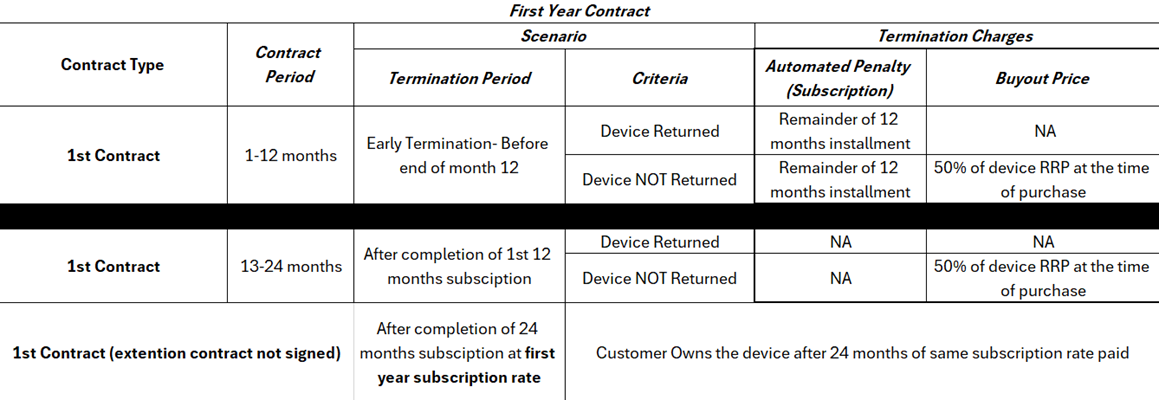
- Can I choose the colour of my iPhone?
Yes, during order confirmation subject to stock availability of the eligible model - Can I have the phone delivered to a different address?
Yes, as long as it’s within Qatar and based on a successful verification of your QID at the time of delivery. - Do I need to be present at the time of delivery?
Yes. The person whose name is on the subscription contract must show QID and sign on the subscription contract and delivery note - Is insurance included?
Yes. It covers accidental damage, liquid damage, screen damage, loss or theft for the 1st Year only, insurance value is capped up to the original value of the device as per contract. To claim insurance, you need to ensure that there is no overdue against their monthly Vodafone Post-paid subscription. - What are the claim conditions?
You can make up to 2 claims. Insurance cover is capped up to the original value of the device. Vodafone Service centre will charge QAR 99 per claim which needs to be paid by the customer. Any claim must be reported within 48 hours with a valid Police report issued by the relevant authorities in Qatar if the phone is lost or stolen. - Who handles insurance claims?
All claims will be managed by Vodafone Service Centre (Qatar Mobile) unless any additional partners are added in future. https://qatarmobile.qa/Contact +974 7447 6636 | +974 7793 8025 - What if I lose or break the phone — am I covered?
Yes. These situations are covered under your insurance and capped up to the original value of the device, provided the claim is reported within 48 hours with a valid Police report issued by the relevant authorities in Qatar. Claims against Lost/Stolen devices outside Qatar will not be covered under insurance. - Will my old data be transferred to the new phone?
Considering the security risks, data transfer is to be managed and responsibility of the owner of the device. - How do I know my data is safe after I return the phone at the end of the contract period?
Revio uses GSMA-certified, military-grade data wipe to erasure customer data is erased safely. Customer must also ensure to back up and then erase all personal data from the device, sign out from Find My iPhone/iCloud before handing over the device to Vodafone. - Is this offer environmentally friendly?
Yes. Phones are refurbished and reused, hence reducing e-waste. - Can I get a replacement phone while mine is being repaired?
No, in case of a repair, Service centre will ensure the phone is repaired and handed over to the customer as soon as possible. - How long does a repair take?
Typically, 2-3 hour on a business day, however repair time may vary based on part availability. - Can I cancel the subscription early or upgrade to new device before 12 months?
Yes. You can end the contract early or upgrade to new device before 12 months by either(a) paying the remaining monthly subscription and returning the current device in good working condition, or
(b) paying the remaining subscription plus 50% of the current device's original value as per contract if you wish to keep the phone.
- Can I buy the phone after 12 months?
Yes, in order to buy the phone after 12 months, you need to make sure that there are no outstanding of subscription plus pay an additional 50% of original price of the device as per contract.OR
At the end of the subscription term (12 Months), the customer can return the current device in good working condition and upgrade to the latest similar device model for the same monthly cost by sign up for a new contract.
OR
Towards end of the subscription term the customer can also sign up for a new contract to continue the device lease subscription for the same device at 50% lower cost by visiting select Vodafone stores. (Customer must visit Vodafone store min 7days prior to bill cycle or 12 Months contract expiry).
Plans and early Termination charges working
Phone Model Memory VFQ RRP QAR Year 2 extension QAR iPhone 17 Pro Max 256GB 5049 149 512GB 5899 179 1TB 6699 199 2TB 8399 249 iPhone 17 Pro 256GB 4649 139 512GB 5499 159 1TB 6299 189 iPhone 17 Air 256GB 4199 129 512GB 5099 149 1TB 5899 179 iPhone 17 256GB 3349 99 512GB 4199 129
Device Condition Acceptable at the time of Return/Buy Back. Carrier & iCloud must be unlocked Minor Scratches due to normal usage is allowed, but no cracks to the display and back cover Device charging properly with min 80% battery capacity Front/Back Camera in working condition with no cracks Face ID/Touch ID in working condition All Buttons (Volume up/down, power on) in working condition Charging Port in working condition Erase Data and Reset to factory Settings
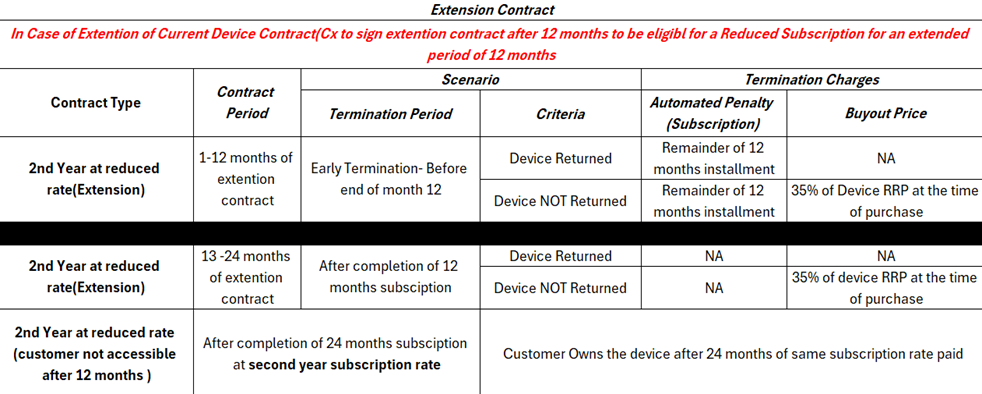
If the Customer does not return the device or sign up for a new contract to continue the service at a lower cost, the subscription will continue at the current monthly rate for the next 12 months. Ownership of the device will be transferred to the customer after twenty-four (24) months from the 1st Subscription date.
FAQs- Pay Later
- What is PayLater?
PayLater is Buy Now Pay Later (BNPL) solution, allowing shoppers to split their payments for handset/devices (“Device”) into four equal monthly instalments which is interest free with participating merchants including Vodafone Qatar. This payment method offers flexibility and convenience, enabling users to make purchase of Devices immediately and pay for them over time. - How does it work?
PayLater allows shoppers to make purchases upfront and divide the amount into four equal monthly instalments. At checkout, shoppers can select PayLater as their payment option. The first instalment is paid at the time of purchase, with the remaining three instalments spread over three months. - Can a customer bill payments using PayLater service?
PayLater service is only applicable to purchase of Devices . - What is the minimum limit for the Buy Now Pay Later service for instalments?
The minimum limit for a Device to be eligible for instalments is QAR 300 with no maximum limit. - Is PayLater Shariah compliant?
Yes, PayLater is Shariah compliant and does not charge any interest from shoppers. - What are the different payment methods I can use?
In select Vodafone Retail stores below, customers can use PayLater by scanning the QR code provided at the checkout counter. This seamlessly integrates PayLater into the point-of-sale system for easy payment processing such as:- Villaggio
- City Center
- Doha Festival City
- Lulu D Ring
- Mall of Qatar
- Lulu Gharaffa
- Wakrah
- Landmark
- Industrial
- Furosiya
- Kharatiyat
- Pearl
- Vendome
- North Gate
- Mobile Truck
- How can I sign up for PayLater?
- Visit www.paylaterapp.com or download the PayLater app from the App Store or Google Play store.
- Click on the "Sign Up" button.
- Fill in your valid email address and Qatari phone number.
- After receiving the OTP, enter it to proceed.
- Upload your QID (front and back) and complete facial verification for 5 seconds.
- Visit www.paylaterapp.com or download the PayLater app from the App Store or Google Play store.
- Click on the "Sign Up" button.
- Fill in your valid email address and valid Qatari phone number.
- After receiving the OTP, proceed to fill it in.
- Upload your QID from the front and back sides and complete facial verification for 5 seconds.
If you encounter any issues during the sign-up process, you can reach out to support at support@paylaterapp.com.
- What do I need to be eligible for a PayLater account?
To utilize PayLater’s BNPL services, you must meet the following eligibility criteria:- Valid Qatar ID
- At least 18 years of age
- Permanent residential address in Qatar
- Active email account registered in your name
- Active mobile number registered in your name
- Operational local bank account in Qatar
- You agree to the T&C available at https://paylaterapp.com/terms-and-conditions/
- How long will it take to verify my documents?
The verification time can vary based on several factors, including the volume of requests and the accuracy of the information provided. PayLater aims to complete document verification as quickly as possible. Ensure you provide accurate and legible documents and follow any instructions provided by PayLater. For any concerns or delays, contact PayLater customer support for assistance. - How can I add or remove a card from my account?
You can add or remove a card by navigating to the Payment Details section in the Accounts page.
- Can I use my debit card or credit card to make payments through PayLater?
Yes, you can use both debit and credit cards to make payments through PayLater. Link your preferred card to your PayLater account and use it for transactions. - How do I make repayments with PayLater?
- Automatic Deduction: PayLater typically handles repayments automatically through the app. Payments are deducted directly from your PayLater account on the scheduled due dates.
- Manual Payment via Order Section: If you prefer manual payments, you can do so through the PayLater app:
- Click on the Orders Section.
- Review your active orders.
- Select the order you wish to pay and click on Pay Now.
- How can a customer increase their limit on the account?
Limit increases are based on customer behavior. Timely payments will support an automatic limit increase. - What is the refund policy for a customer who made a transaction using PayLater?
The refund policy remains the same as Vodafone Retail Policy available at Vodafone Qatar | Online and Retail Return policy| vodafone.qa - If agents mistakenly accept an order (wrong amount entered by the customer), how can it be canceled immediately?
If the order is accepted, it must be refunded through the PayLater Merchant Portal, using admin access. - What if customer changes mind after purchase of device and wants refund?
Agent must initiate refund in PayLater Merchant Portal and like wise in Wincash. - Can a customer use multiple accounts (friend or family member) to buy a device in a single transaction?
No, this is not acceptable. - What happens when a customer misses a payment?
PayLater will notify the customer and follow up with the customer If the amount is not paid within 30 days then the pending payment will be reported to the Qatar Credit Bureau. - Can a customer make early (advance) payments?
Yes, customers can make early settlements anytime by logging into the PayLater App and selecting the option. - What happens if a customer doesn’t pay?
PayLater will charge a penalty of QAR 50 for late payment for evry month the installment remains due and this amount will be added to the total outstanding amount. The late payment penalty will be donated to an authorised charity in Qatar. - In case of customer change of mind, what is the process of refunding or reversing with Pay Later?
Retail Agent must initiate refund in PayLater Merchant Portal and like wise in Wincash. - In case of complaints received at Call Centre regarding Pay Later, do agents redirect them to the retail store where they purchased the device?
If the complaint is regarding the device, please advise as per BAU.
If it is related to PayLater or its application, please refer the customer to the Pay Later Support team:
Email : support@paylaterapp.com
Call/Whatsapp : +974 5107 9431 - In case of any issues retail team may face, who is the SPOC from Vodafone side to address the issues?
Paul, Biju, Vodafone Qatar <biju.paul@vodafone.qa>
Parvez, Modassam, Vodafone Qatar <modassam.aslam@vodafone.qa>
iPhone 15 Series and iPads 2024 Digital Promotion FAQ’s
- What is the promotion?
You can get a QR100 promo code ("Code") from Vodafone Qatar through Social Media Posts or Google Ads. You can use the Code to get QR200 discount on the iPhone 15 Series and iPads 2024 ("Device") on eShop (on the Vodafone website) - Can I apply the promo code multiple times in the same transaction?
You can redeem the Code only once. - How long is the promo code valid?
The promo code is valid till 24 November 2024. - Where can I redeem this offer?
You must visit the Vodafone website and can redeem the code only on iPhone 15 Series and iPads 2024. - Can I redeem this offer at the Vodafone store?
This promo code can be redeemed only on the Vodafone website and not through any Retail or other Sales channels. - Will the promo code be valid on both COD orders and credit card payment?
Yes, the Code can be redeemed on both Cash on Delivery or credit card payments. - I am unable to redeem the Code, what should I do?
If Code is not working, you will need to raise a complaint to customer care. - I am unable to buy the device of my choice using the promo code as the device is out of stock.
Vodafone is not responsible in case stock is not available for a specific model, color or capacity of the Device. - What is the Vodafone return and warranty policy with regards to orders placed using this promo code?
Vodafone return and warranty policy apply which can be found at http://www.vodafone.qa/en/legal-and-regulatory/online-returns-and-warranty-policy.
iPhone 15 Series Digital Promotion
- What is the promotion?
You can get a QR100 promo code ("Code") from Vodafone Qatar through Social Media Posts or Google Ads. You can use the Code to get QR100 discount on the iPhone 15 series ("Device") on eShop (on the Vodafone website) - Can I apply the promo code multiple times in the same transaction?
You can redeem the Code only once. - How long is the promo code valid?
The promo code is valid till 28 September 2024. - Where can I redeem this offer?
You must visit the Vodafone website and can redeem the code only on iPhone 15 series. - Can I redeem this offer at the Vodafone store?
This promo code can be redeemed only on the Vodafone website and not through any Retail or other Sales channels. - Will the promo code be valid on both COD orders and credit card payment?
Yes, the Code can be redeemed on both Cash on Delivery or credit card payments. - I am unable to redeem the Code, what should I do?
If Code is not working, you will need to raise a complaint to customer care. - I am unable to buy the device of my choice using the promo code as the device is out of stock.
Vodafone is not responsible in case stock is not available for a specific model, color or capacity of the Device. - What is the Vodafone return and warranty policy with regards to orders placed using this promo code?
Vodafone return and warranty policy apply which can be found at https://www.vodafone.qa/en/about-us/legal-and-regulatory/policy/online-retail-stores-return-and-warranty-policy.
FAQ Online Trade-in
- What is Vodafone Trade-in Program?
The Vodafone Trade-in Program is a service that allows customers to exchange their current or used devices for credit toward the purchase of a new device from Vodafone.
The final sale value of your device will be based on fixed criteria such as:- Device Model and physical condition
- Device functionality
- Battery functionality
- Display Screen condition/intactness
- How can I buy a new device through Vodafone website by trading in my old device?
Simply fill in the Trade-in Request Form on the website, and our team will contact you within 24 hours to assist with your request.- Trade-in requests received before 11:00 AM on a business day (Saturday to Thursday) will be completed on the same day.
- Requests received after 11:00 AM or on a public holiday will be completed on the next business day.
- Trade-in requests submitted on Vodafone’s website will be fulfilled either directly by Vodafone or through a third-party partner.
- How can I ensure that my personal data is safe?
Before handing over your device to Vodafone or its partners, please ensure you back up and erase all your data from the device. This ensures your personal information is completely removed before trading in your device. - Should I factory reset my old device before trading it in?
Yes. As a best practice, we advise all customers to first back up and erase all personal data before performing a factory reset and trading in their device. - What are the eligibility criteria for trade-in?
To trade in a device, you must be at least 18 years old and possess a valid QID. The device must belong to you and be free of any legal or commercial constraints. - Which device can be traded in through Vodafone Trade-in Program?
Customers can trade in mobiles phones, smart watches, and tablets from various brands for credit toward purchasing a new device from Vodafone. - What should I bring when trading in my device?
- For a smartwatch: Watch + strap + charging cable/dock
- For handsets and tablets: Only the old/current device is required
- How many devices can I trade in at a time?
Vodafone Qatar accepts a maximum of three (3) devices per transaction against the purchase of a new device from Vodafone. - Can I get the trade-in value in cash?
No. The trade-in value can only be used as credit toward purchasing a new device from Vodafone. - Can I trade in my device if it is locked to a Cloud account (iCloud/Samsung Cloud)?
No, we do not accept devices that are locked to iCloud or Samsung Cloud. - Can I get the same price as shown on the website for my old device?
Yes, if your device meets the evaluation criteria. However, the prices shown on the website are indicative and are subject to change based on physical evaluation of the device by Vodafone. - Can I get my old device back if I change my mind later?
No. All trade-ins are final. Once you have traded in your device, it cannot be returned at any time.
- What is Vodafone Trade-in Program?


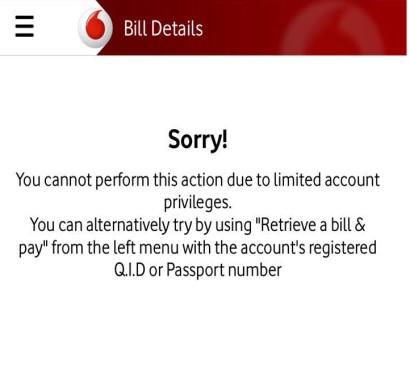



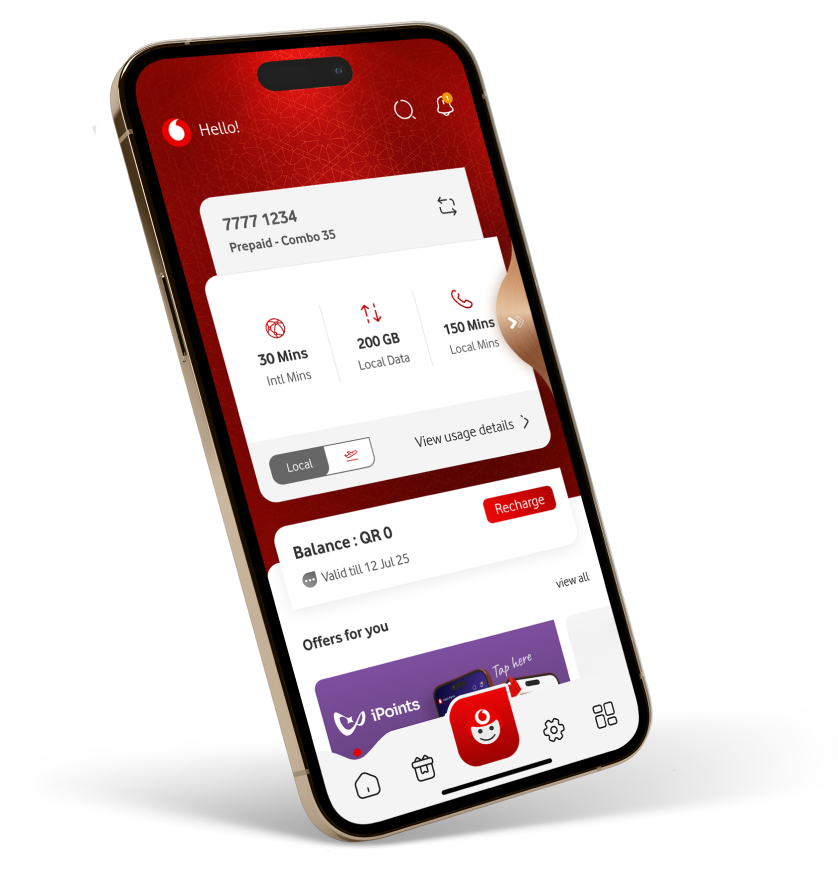





Do it online 
 We’re available 24/7. Chat with us
 Whatsapp us

Follow us


